vendure-data-hub-plugin
User Guide
This guide covers using Data Hub in the Vendure Dashboard to create and manage data pipelines.
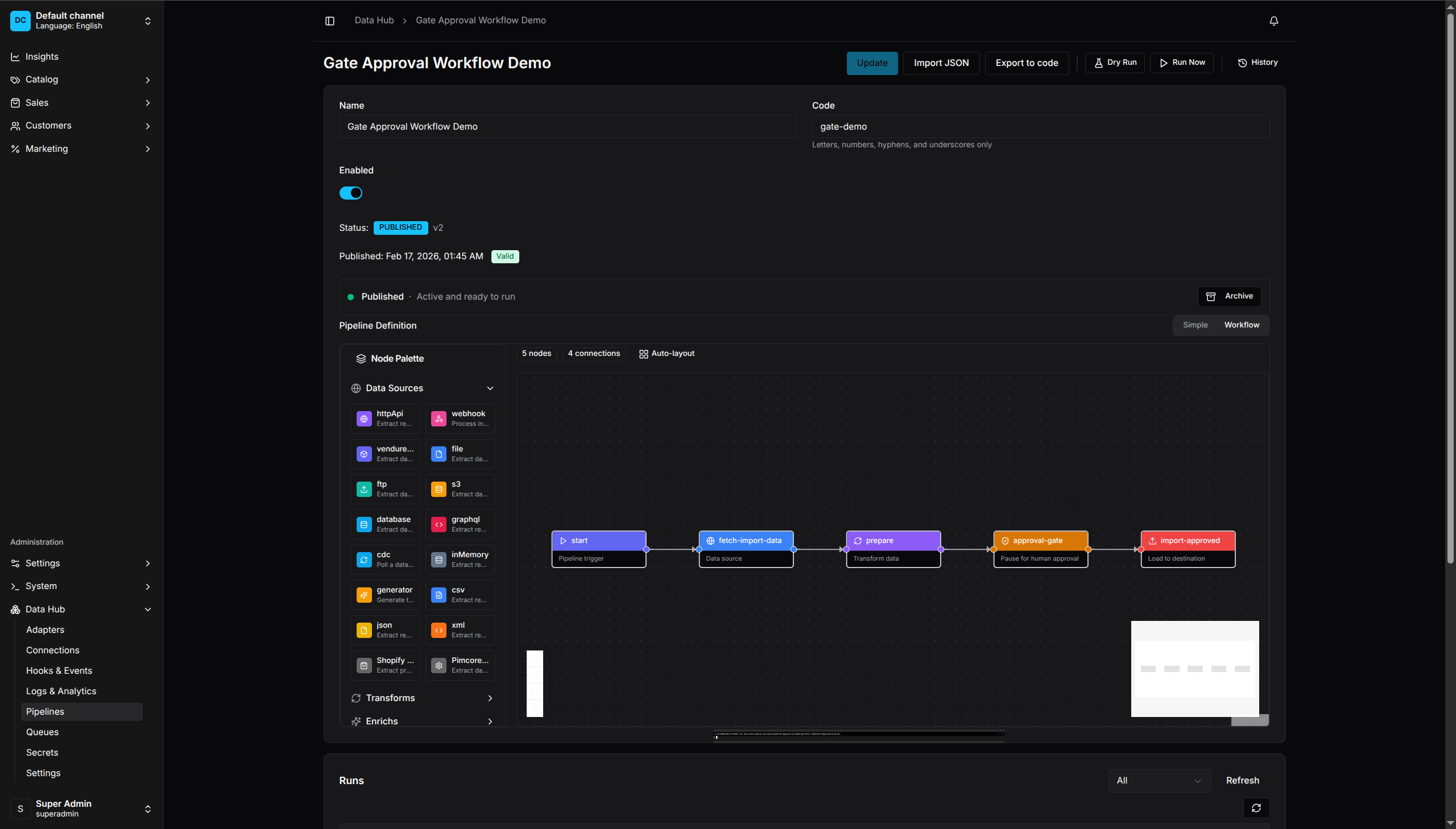
Visual Pipeline Editor - Drag-and-drop interface for building data pipelines
Contents
- Creating Pipelines - Build and edit pipelines with the visual editor
- Import/Export Wizards - Step-by-step guide to data import and export wizards
- Advanced Recipes - Real-world pipeline examples and patterns
- Managing Connections - Set up database and API connections
- Secrets Management - Store API keys and credentials securely
- Scheduling Pipelines - Automate pipeline execution
- Monitoring & Logs - Track runs and debug issues
- Product Feeds - Generate feeds for Google, Meta, and more
- Queue & Messaging - Consume from and produce to message queues
- External Integrations - Search engines, webhooks, and external APIs
- Schema Registry - Version and bind input/validation contracts
Accessing Data Hub
- Log in to the Vendure Dashboard
- Click Data Hub in the left navigation menu
- Open Pipelines to create, edit, run, and inspect pipelines
Dashboard Overview
Data Hub does not currently have a separate overview or upcoming-schedules page. Operational information is distributed across pipeline details, Queues, and Logs & Analytics.
Navigation
| Section | Purpose |
|---|---|
| Pipelines | Create, edit, publish, run, and inspect per-pipeline run history |
| Connections | Manage external system connections |
| Secrets | Store sensitive credentials |
| Adapters | Inspect registered runtime capabilities and schemas |
| Schemas | Manage immutable, versioned record contracts and inspect pipeline impact |
| Queues | View queue aggregates, dead letters, recent failures, and message consumers |
| Hooks | Inspect hooks and the process-local recent-event buffer |
| Logs & Analytics | Search persisted logs, view log statistics, and follow the polling log feed |
| Settings | Configure plugin options |
Record errors are available from run details and the Queues dead-letter tab; there is no standalone Errors route.
Required Permissions
To use Data Hub, your admin role needs these permissions:
| Action | Permission Required |
|---|---|
| View pipelines | ReadDataHubPipeline |
| Create/edit pipelines | CreateDataHubPipeline, UpdateDataHubPipeline |
| Run pipelines | RunDataHubPipeline |
| View run history | ViewDataHubRuns |
| Manage connections | ManageDataHubConnections |
| Manage secrets | CreateDataHubSecret, ReadDataHubSecret, UpdateDataHubSecret, DeleteDataHubSecret |
| Run pipelines that reference connections or secrets | UseDataHubConnection, UseDataHubSecret as required by the definition |
| View/retry quarantined records unchanged | ViewDataHubQuarantine, ReplayDataHubRecord |
| Retry quarantined records with a payload patch | ViewDataHubQuarantine, ReplayDataHubRecord, EditDataHubQuarantine |
| Configure settings | UpdateDataHubSettings |
| View schema versions | ReadDataHubSchema |
| Create schema versions | CreateDataHubSchema |
| Edit schema metadata | UpdateDataHubSchema |
| Delete unused schema versions | DeleteDataHubSchema |
Ask your administrator to assign these permissions if you don’t have access.