vendure-data-hub-plugin

@oronts/vendure-data-hub-plugin
Enterprise ETL & Data Integration for Vendure E-commerce




Features • Installation • Quick Start • Extractors • Operators • Loaders • Hooks • Docs • License
License: Commercial plugin — free for personal, learning, and non-commercial use. Commercial use requires a license. Contact office@oronts.com for details. See License.
A full-featured ETL (Extract, Transform, Load) plugin for Vendure e-commerce. Build data pipelines to import products, sync inventory, generate product feeds, index to search engines, and integrate with external systems.
Features
- Visual Pipeline Builder - Drag-and-drop workflow editor with live validation
- Code-First DSL - TypeScript API for defining pipelines programmatically
- 13 Data Extractors - HTTP/REST API, GraphQL, Vendure Query, uploaded or inline CSV/JSON/XML/XLSX, in-memory data, generators, Database (SQL), S3, FTP/SFTP, and CDC (Change Data Capture)
- 24 Entity Loaders (16 entity types, 4 order operations, 1 deletion, 2 external API, 1 inventory) - Products, Variants, Customers, Customer Groups, Collections, Facets, Facet Values, Promotions, Orders (upsert, notes, transitions, coupons), Shipping Methods, Stock Locations, Stock/Inventory, Assets, Tax Rates, Payment Methods, Channels, Entity Deletion, REST POST, GraphQL Mutation
- 62 Transform Operators - String (12), Date (5), Numeric (9), Logic (4), JSON (4), Data (8), Enrichment (5), Aggregation (9), Validation (2), Script (1), File (3) - includes HTTP Lookup with caching, circuit breaker, and rate limiting
- 4 Feed Generators - Google Merchant Center, Meta/Facebook Catalog, Amazon Seller Central, Custom Feed (CSV/JSON/XML/TSV)
- 7 Search & Integration Sinks - Elasticsearch, OpenSearch, MeiliSearch, Algolia, Typesense, Queue Producer (RabbitMQ/SQS/Redis), Webhook (with HMAC signing)
- 24 Hook Stages (18 for step types and 6 global) - Interceptors and scripts modify records at the 18 data stages; global lifecycle/error stages are observation-only
- 12 Canonical Connection Types - HTTP, REST, GraphQL, S3, FTP, SFTP, PostgreSQL, MySQL, RabbitMQ, SQS, Redis, and Custom
- 6 Trigger Types - Manual, Scheduled (cron or interval), Webhook, Vendure Events, File Watch, Message Queue Consumer
- Bi-directional Queue Support - Consume from and produce to RabbitMQ (AMQP), Amazon SQS, Redis Streams, and internal queue adapter
- Horizontal Scaling - Distributed locks via Redis or PostgreSQL for multi-instance deployments
- Persistent Adapter Checkpoints - File offsets, incremental cursors, file-watch state, and approval gates persist the progress they explicitly record
- Versioned Schema Registry - Immutable Data Hub record contracts with compatibility checks, exact Extract/Validate bindings, version diffs, and reference impact analysis
- File Upload - Drag-and-drop CSV, JSON, XML, and XLSX uploads with preview and managed processing
- Operational Monitoring - Polling logs, run details, queue statistics, and dead letter records
- Nested Entity Modes - Configurable behavior for all nested entities (addresses, facet values, order lines, assets, etc.) to prevent duplicates and provide full control over data management
Screenshots
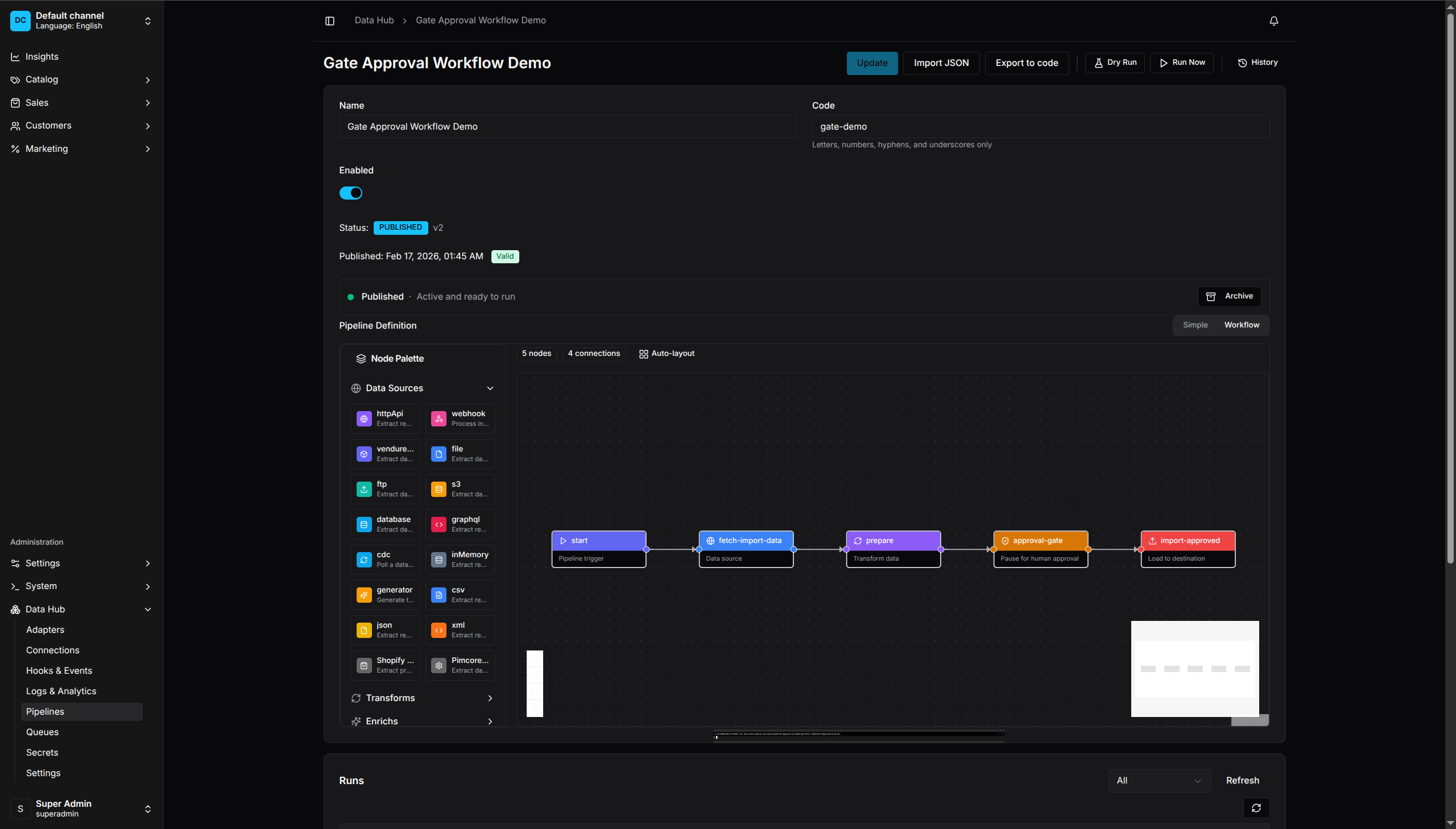
Visual Pipeline Editor - Drag-and-drop workflow builder
View More Screenshots
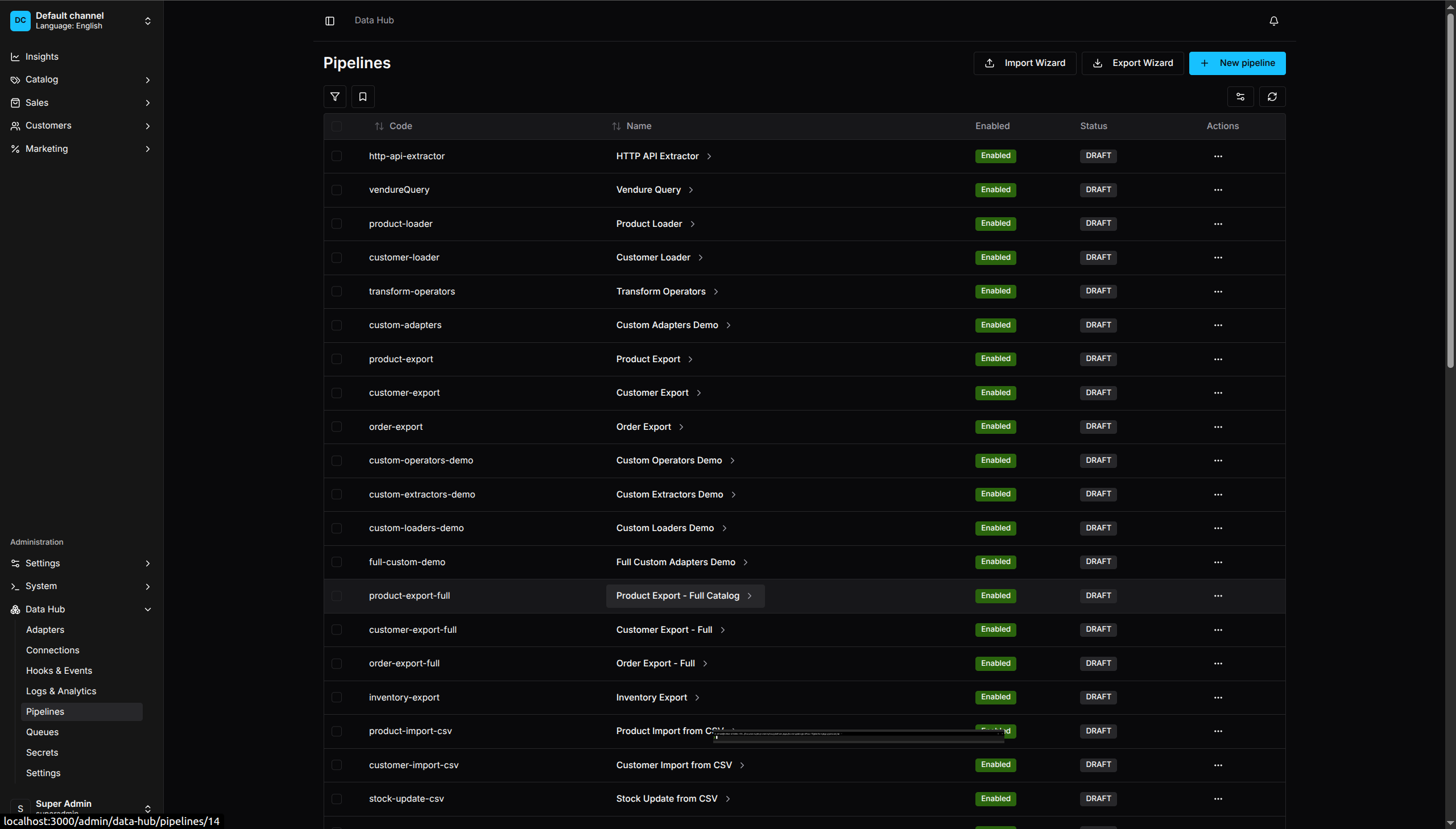
Pipeline Management - Overview of all data pipelines
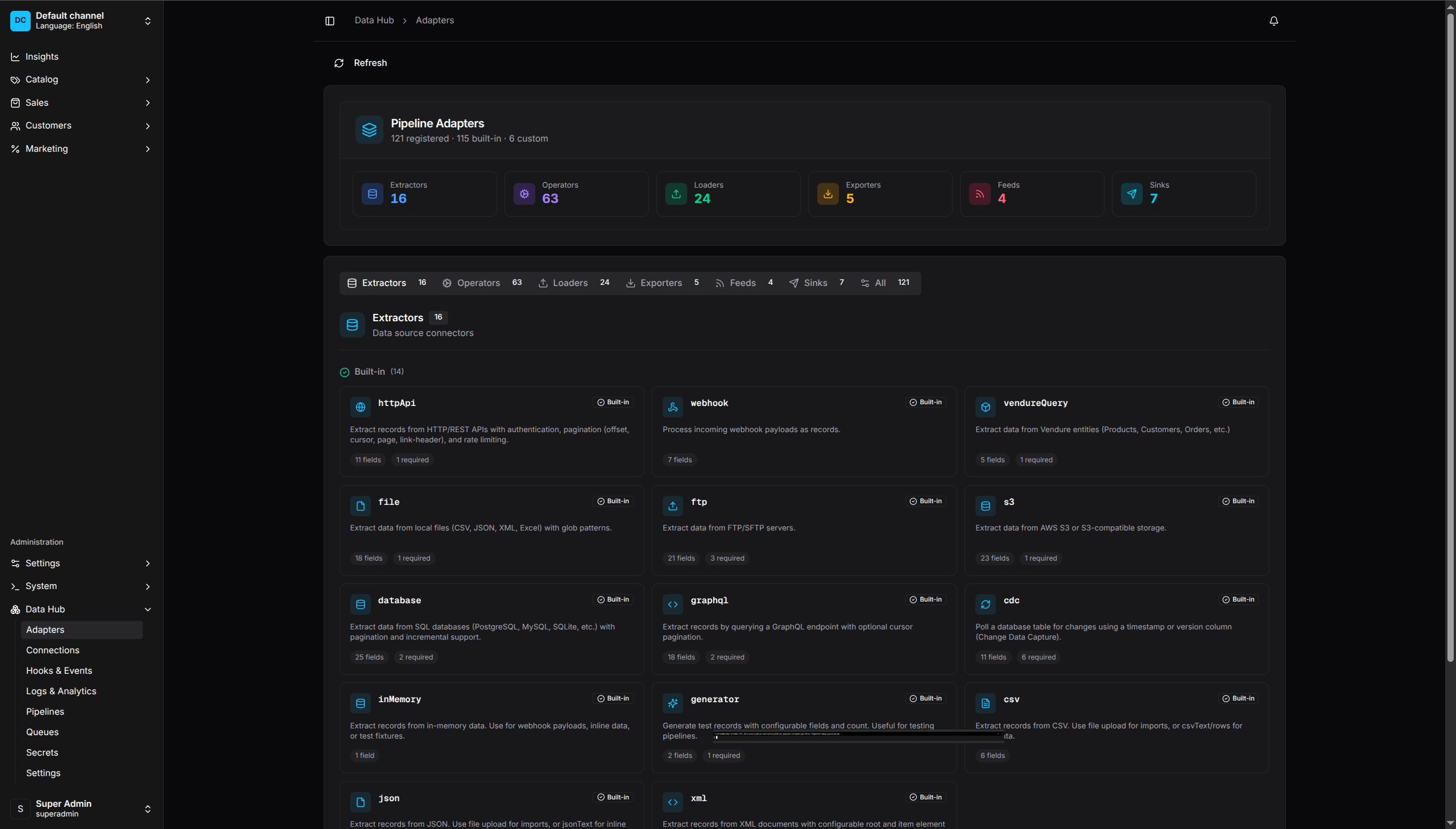
Adapters Catalog - Extractors, Operators, and Loaders
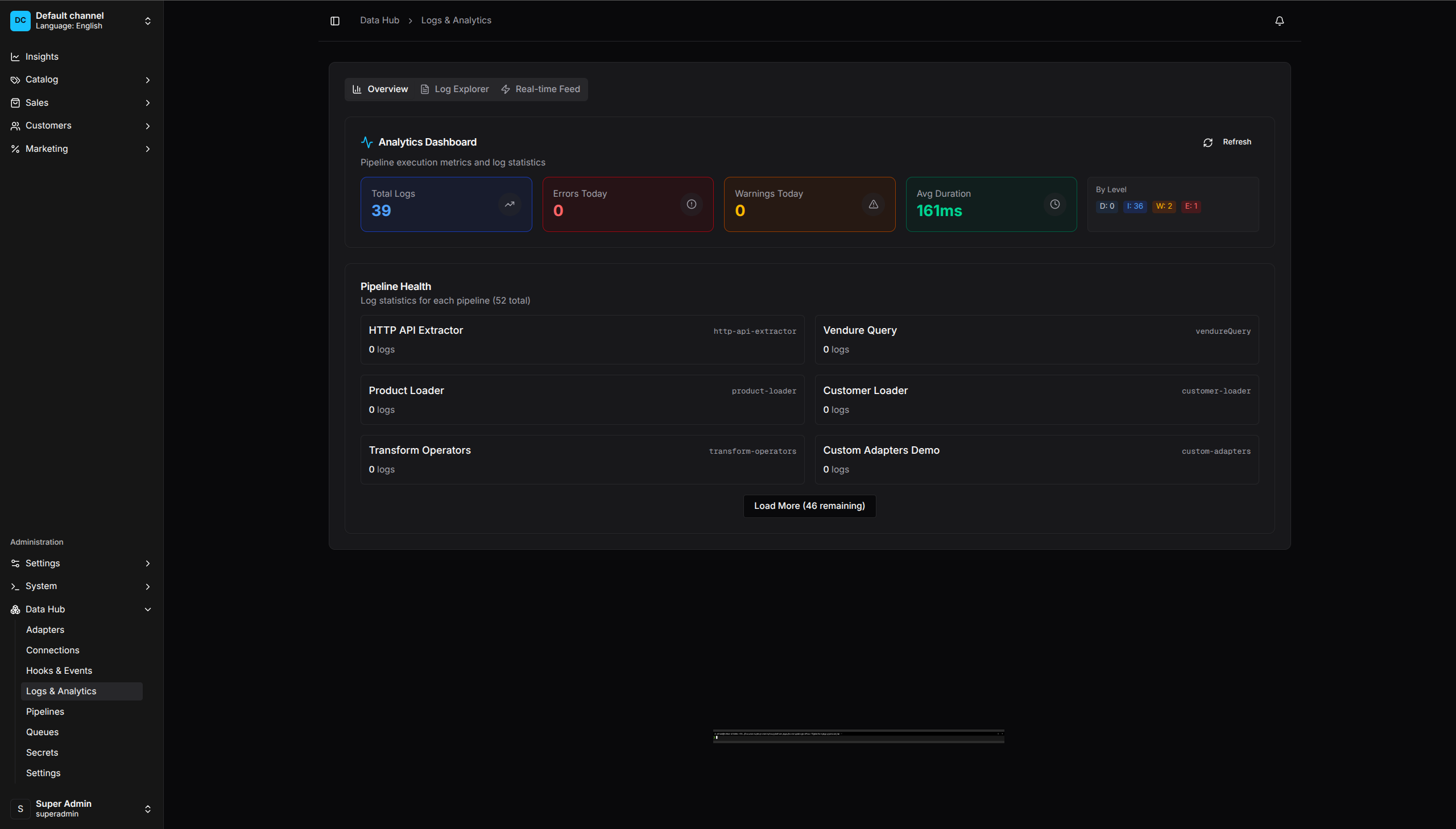
Logs & Analytics - Polling log feed and pipeline log statistics
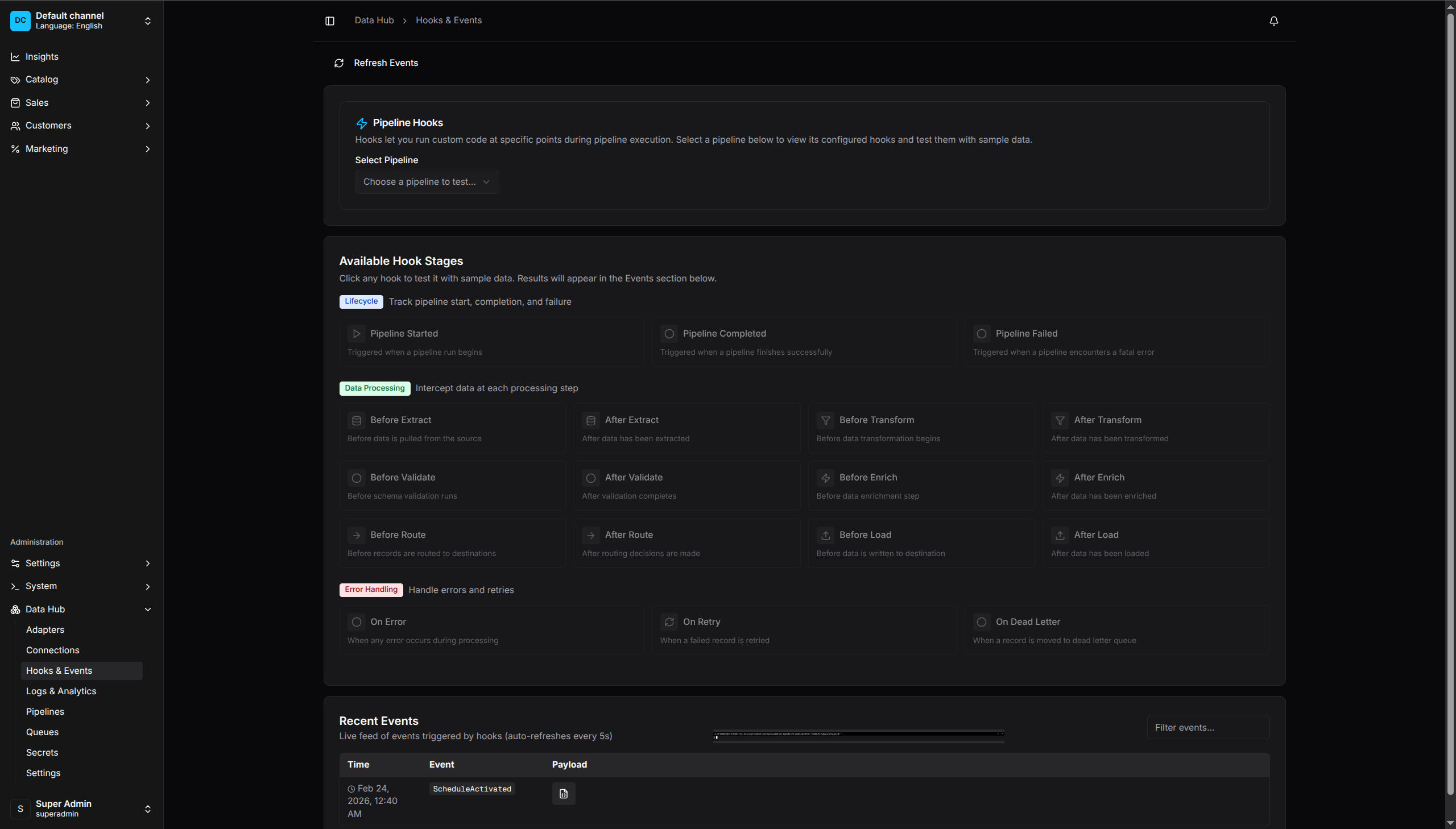
Hooks & Events - Test hooks and view pipeline events
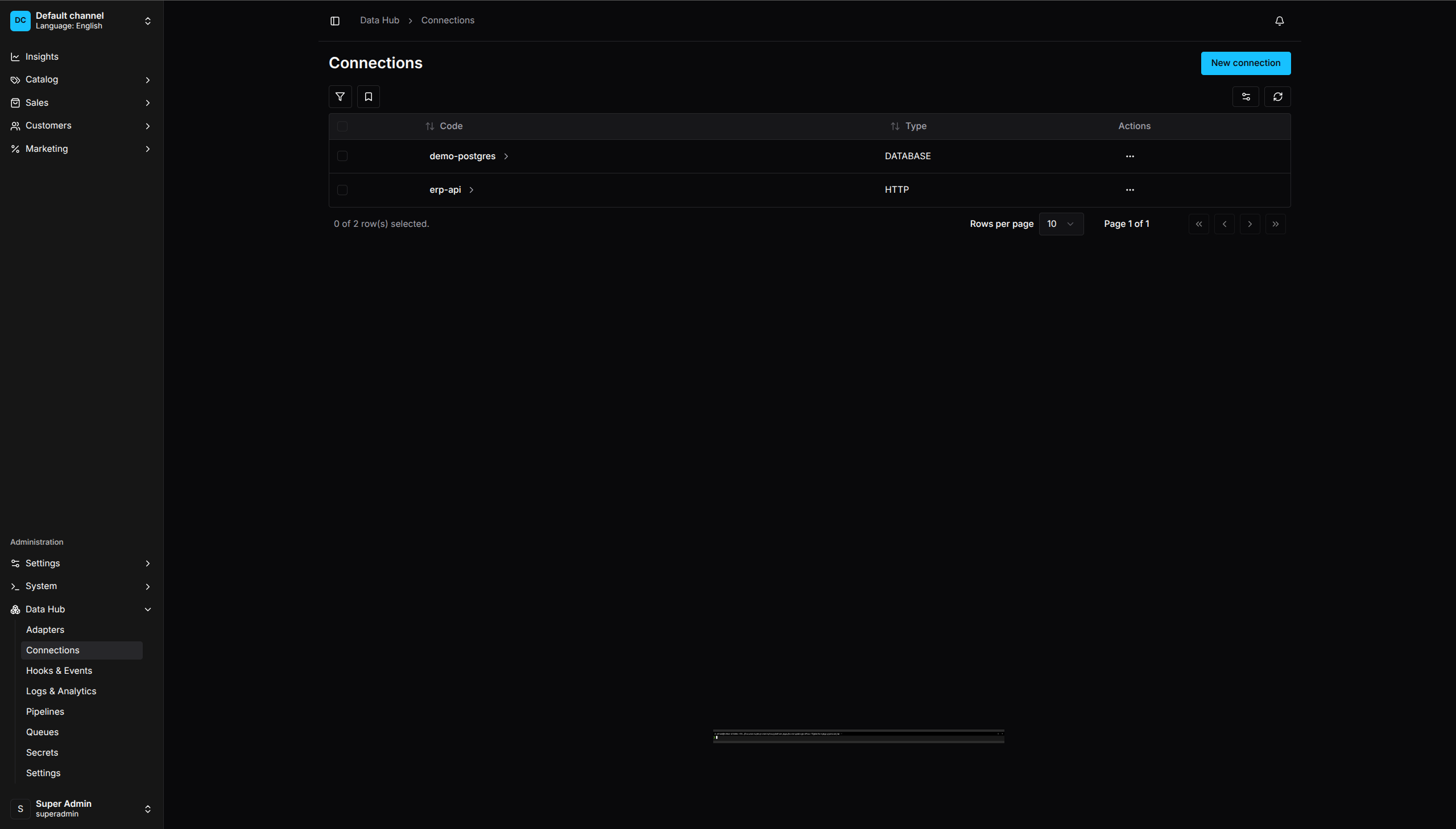
Connections - Manage external system credentials
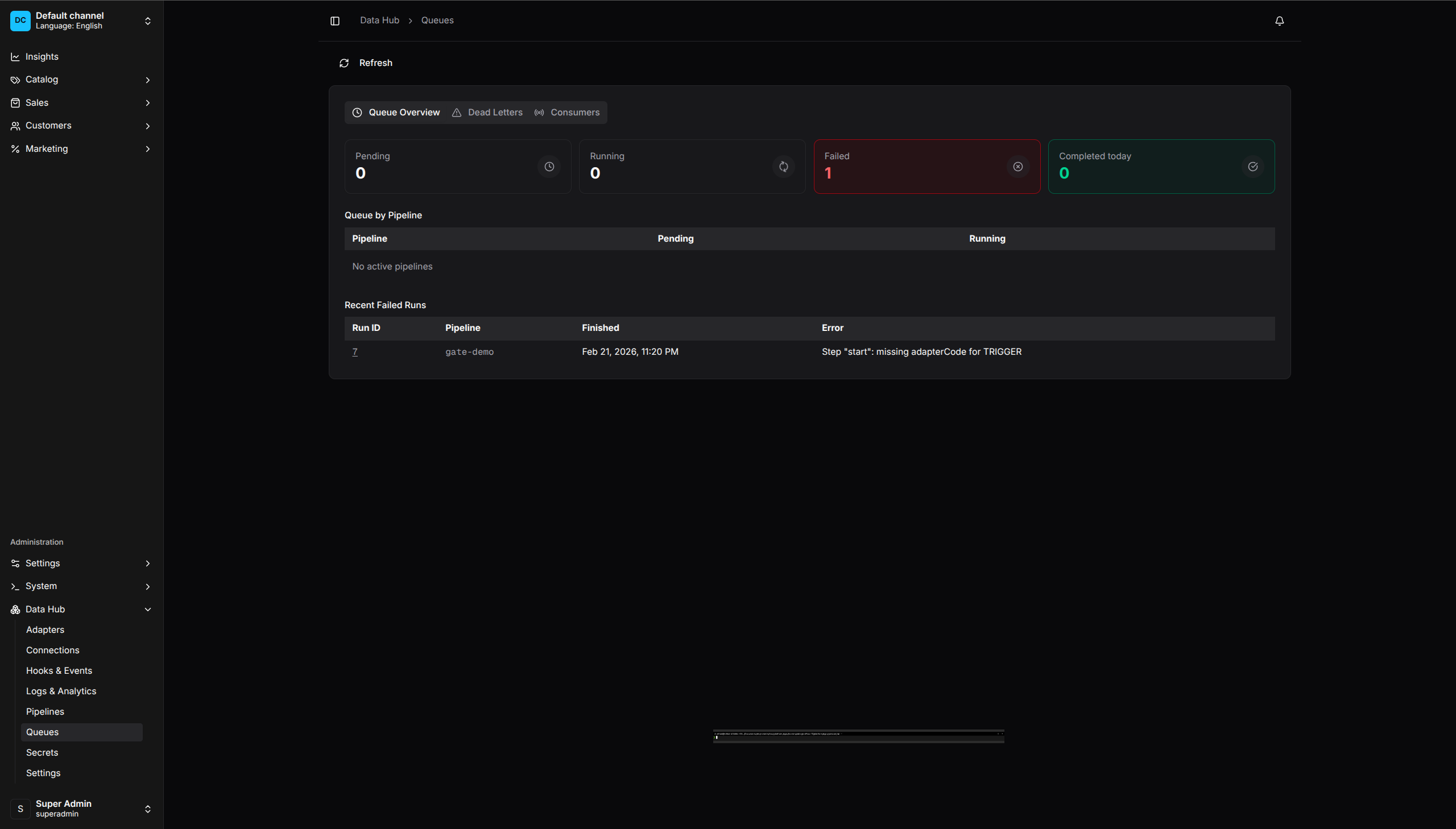
Queues - Monitor pipeline execution and dead letters
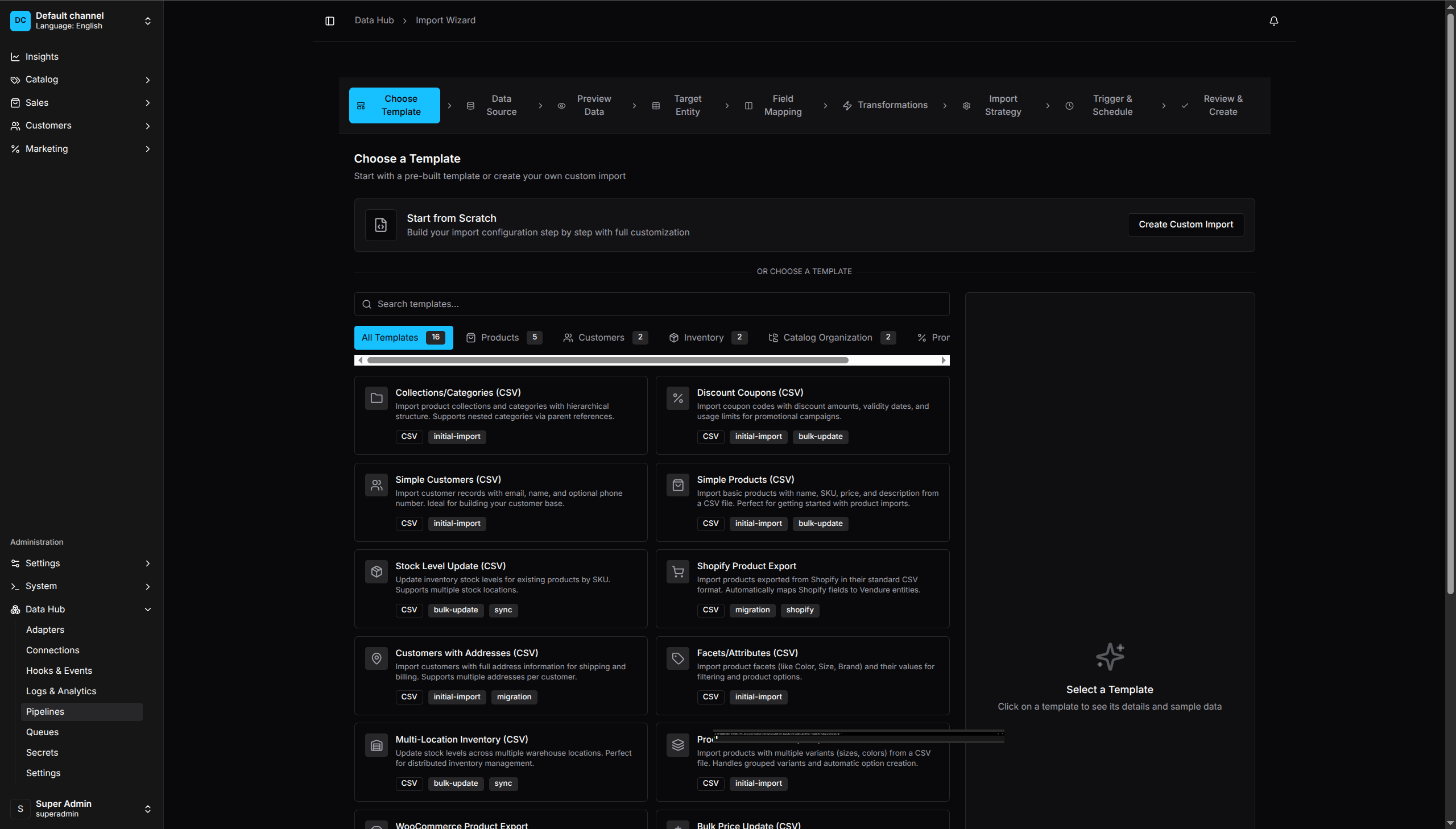
Import Wizard - Step-by-step guided data import with templates
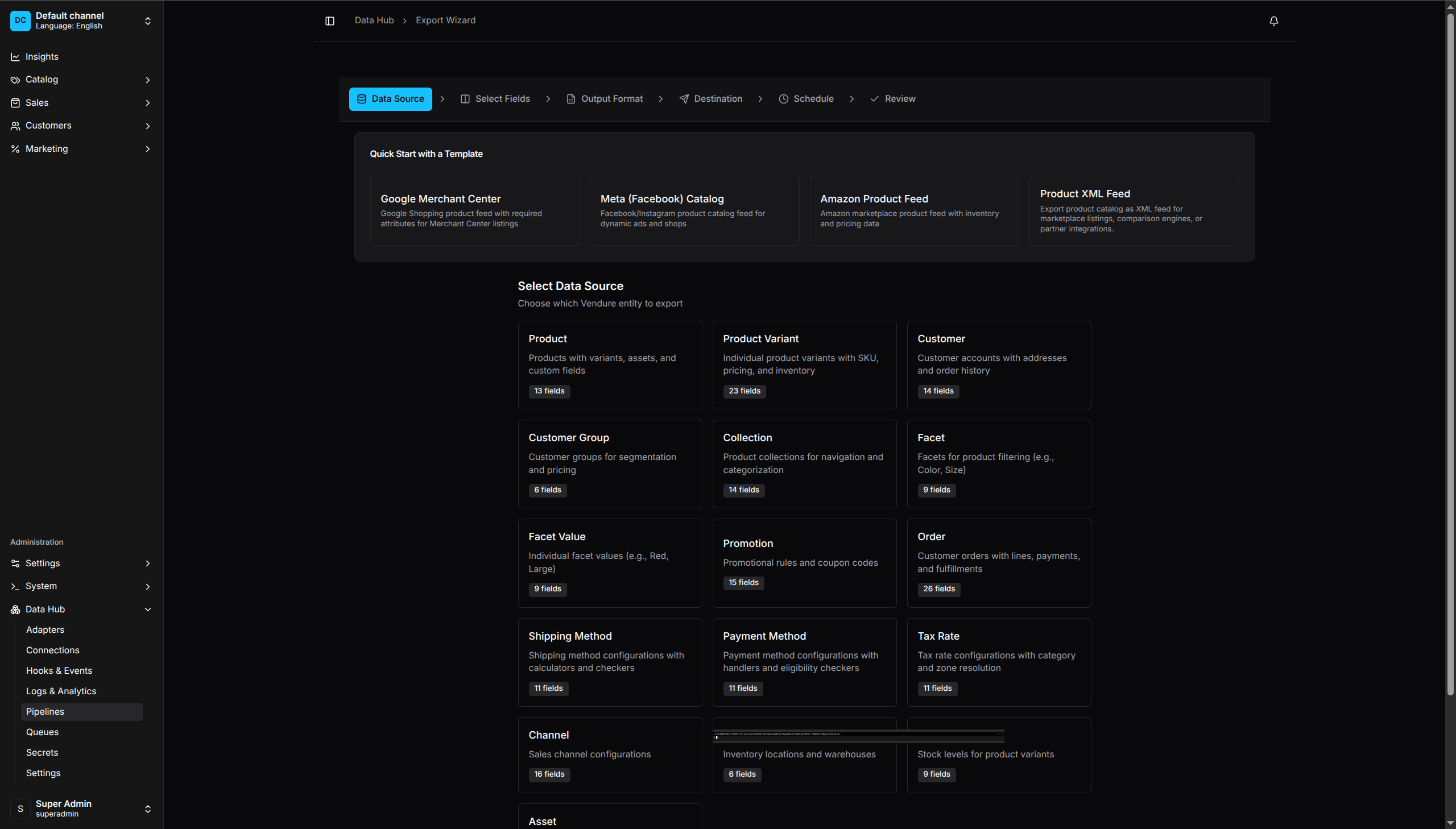
Export Wizard - Generate product feeds for Google, Facebook, Amazon
Installation
npm install @oronts/vendure-data-hub-plugin
Quick Start
Basic Setup
// vendure-config.ts
import { VendureConfig } from '@vendure/core';
import { DataHubPlugin } from '@oronts/vendure-data-hub-plugin';

export const config: VendureConfig = {
    plugins: [
        DataHubPlugin.init(),
    ],
};
The plugin adds a “Data Hub” section to your admin dashboard for creating and managing pipelines.
Code-First Pipeline
Define pipelines in TypeScript:
import { DataHubPlugin, createPipeline } from '@oronts/vendure-data-hub-plugin';

const productImport = createPipeline()
    .name('Product Import')
    .description('Import products from supplier API')
    .capabilities({ requires: ['UpdateCatalog'] })
    .trigger('start', { type: 'MANUAL' })
    .extract('fetch-products', {
        adapterCode: 'httpApi',
        url: 'https://api.supplier.com/products',
        method: 'GET',
        dataPath: 'data.products',
        pagination: {
            type: 'PAGE',
            limit: 100,
            maxPages: 100,
        },
    })
    .transform('prepare', {
        operators: [
            { op: 'validateRequired', args: { fields: ['sku', 'name', 'price'] } },
            { op: 'trim', args: { path: 'name' } },
            { op: 'slugify', args: { source: 'name', target: 'slug' } },
            { op: 'currency', args: { source: 'price', target: 'priceInCents', decimals: 2 } },
            { op: 'set', args: { path: 'enabled', value: true } },
        ],
    })
    .load('upsert', {
        adapterCode: 'productUpsert',
        channel: '__default_channel__',
        strategy: 'UPSERT',
        conflictStrategy: 'SOURCE_WINS',
        slugField: 'slug',
    })
    .edge('start', 'fetch-products')
    .edge('fetch-products', 'prepare')
    .edge('prepare', 'upsert')
    .build();

export const config: VendureConfig = {
    plugins: [
        DataHubPlugin.init({
            pipelines: [{
                code: 'product-import',
                name: 'Product Import',
                definition: productImport,
            }],
        }),
    ],
};
Configuration Options
| Option | Type | Default | Description |
|---|---|---|---|
enabled |
boolean |
true |
Enable code-first config/secret startup synchronization; does not unregister plugin APIs |
registerBuiltinAdapters |
boolean |
true |
Register built-in extractors, operators, loaders |
retentionDaysRuns |
number |
30 |
Run-history retention from 0 to 365 days; 0 disables cleanup |
retentionDaysErrors |
number |
90 |
Record-error retention from 0 to 365 days; 0 disables cleanup |
pipelines |
CodeFirstPipeline[] |
[] |
Define pipelines in code |
secrets |
CodeFirstSecret[] |
[] |
Define secrets in code |
connections |
CodeFirstConnection[] |
[] |
Define connections in code |
adapters |
DataHubAdapter[] |
[] |
Register executable custom adapters |
adapterFactories |
DataHubAdapterFactory[] |
[] |
Construct adapters that need Vendure or Nest services |
feedGenerators |
CustomFeedGenerator[] |
[] |
Register custom feed generators |
connectors |
DataHubPluginOptions['connectors'] |
[] |
Register connector templates and runtime adapters |
importTemplates |
CustomImportTemplate[] |
[] |
Extend the import wizard |
exportTemplates |
CustomExportTemplate[] |
[] |
Extend the export wizard |
scripts |
Record<string, ScriptFunction> |
- | Register named hook functions |
configPath |
string |
- | Path to external configuration file |
runtime |
RuntimeLimitsConfig |
- | Circuit-breaker, scheduler, and event-trigger timing overrides |
security |
SecurityConfig |
- | SSRF and script execution controls |
telemetry |
OtlpTelemetryConfig |
- | Optional OTLP/HTTP JSON export for process-local metrics and completed spans |
notifications |
{ smtp?: NotificationSmtpConfig } |
- | Configure gate-notification email delivery |
debug |
boolean |
false |
Enable debug logging |
OpenTelemetry export
Set telemetry.endpoint to an OpenTelemetry Collector base URL to export
vendor-neutral OTLP/HTTP JSON. Data Hub appends /v1/metrics and
/v1/traces; no telemetry leaves the process when this option is omitted or
enabled is false.
const otlpEndpoint = process.env.OTEL_EXPORTER_OTLP_ENDPOINT;

DataHubPlugin.init({
    ...(otlpEndpoint ? {
        telemetry: {
            endpoint: otlpEndpoint,
            serviceName: 'vendure-data-hub',
            serviceVersion: '0.1.8',
            environment: process.env.NODE_ENV,
            headers: process.env.OTEL_EXPORTER_OTLP_API_KEY
                ? { 'x-api-key': process.env.OTEL_EXPORTER_OTLP_API_KEY }
                : undefined,
            tls: process.env.OTEL_EXPORTER_OTLP_CERTIFICATE ? {
                caFile: process.env.OTEL_EXPORTER_OTLP_CERTIFICATE,
            } : undefined,
        },
    } : {}),
})
Export runs asynchronously with request timeouts, a bounded completed-span
queue, bounded request bodies, and bounded metric label cardinality. Transient
collector failures use exponential backoff with jitter and honor Retry-After.
Pipeline execution never waits for collector I/O. Trace attributes use a fixed operational allowlist; record
payloads, configuration objects, user identifiers, secrets, error messages,
and stacks are not exported. Metrics are cumulative and process-local, so
configure every API and worker process that should be observed.
For a private collector CA, set telemetry.tls.caFile. Mutual TLS additionally
uses clientCertificateFile and clientKeyFile; certificate verification
cannot be disabled through plugin options.
Local output storage
DATA_HUB_EXPORT_ROOT sets the root for server-local exporter and feed files. It defaults to <cwd>/exports, where <cwd> is the process working directory. Local exporter path values and feed outputPath values must be relative to this root, such as catalog or feeds/google-shopping.xml; absolute paths, URLs, and .. traversal are not valid local outputs.
Uploaded and generated assets use a separate storage backend. DATA_HUB_STORAGE_TYPE
accepts local (the default) or s3. Local storage uses
DATA_HUB_STORAGE_PATH (default data-hub-uploads). S3 requires
DATA_HUB_S3_BUCKET; it uses the AWS SDK credential chain by default, or the
DATA_HUB_S3_ACCESS_KEY_ID and DATA_HUB_S3_SECRET_ACCESS_KEY pair when
both are configured. See Configuration.
Extractors
Available Extractors
| Extractor | Code | Description |
|---|---|---|
| HTTP/REST API | httpApi |
Fetch from REST APIs with pagination and Secret-backed Bearer, Basic, or API-key authentication |
| GraphQL | graphql |
Query GraphQL endpoints with cursor/offset/relay pagination, variables, auth |
| Vendure Query | vendureQuery |
Query Vendure entities (Product, ProductVariant, Customer, Order, Collection, Facet, FacetValue, Promotion, Asset) |
| CSV | csv |
Parse managed CSV uploads, raw CSV text, or inline rows with configurable delimiter and header handling |
| JSON | json |
Parse managed JSON uploads or raw JSON text with an optional items path |
| XML | xml |
Parse managed XML uploads or raw XML text with a configurable record path |
| XLSX | xlsx |
Parse managed spreadsheet uploads with sheet and header selection |
| In Memory | inMemory |
Read an inline object or array from step configuration |
| Generator | generator |
Generate configurable records for pipeline tests |
| Database | database |
Query PostgreSQL, MySQL/MariaDB, or SQLite with positional parameters |
| S3 | s3 |
Read files from AWS S3 and S3-compatible storage (MinIO, DigitalOcean Spaces) |
| FTP/SFTP | ftp |
Download files from FTP/SFTP servers with SSH key support |
| CDC | cdc |
Polling-based change data capture with checkpoint tracking |
HTTP API Extractor
.extract('fetch', {
    adapterCode: 'httpApi',
    url: 'https://api.example.com/products',
    method: 'GET',
    headers: { 'Accept': 'application/json' },
    dataPath: 'data.items',              // JSON path to records array
    connectionCode: 'my-api',            // Optional: use saved connection
    pagination: {
        type: 'PAGE',
        limit: 100,
        maxPages: 10,
    },
})
Vendure Query Extractor
.extract('products', {
    adapterCode: 'vendureQuery',
    entity: 'PRODUCT',
    relations: ['variants', 'featuredAsset', 'facetValues'],
    batchSize: 100,
})
Operators
Transform operators organized by category. All operators take args with their configuration.
Data Operators
| Operator | Description | Example |
|---|---|---|
set |
Set field to static value | { op: 'set', args: { path: 'enabled', value: true } } |
copy |
Copy field value | { op: 'copy', args: { source: 'id', target: 'externalId' } } |
rename |
Rename field | { op: 'rename', args: { from: 'product_name', to: 'name' } } |
remove |
Delete field | { op: 'remove', args: { path: 'tempField' } } |
map |
Remap multiple fields | { op: 'map', args: { mapping: { name: 'title', desc: 'body' } } } |
template |
String templates | { op: 'template', args: { template: '${firstName} ${lastName}', target: 'fullName' } } |
hash |
Generate hash | { op: 'hash', args: { source: 'data', target: 'checksum', algorithm: 'sha256' } } |
uuid |
Generate UUID | { op: 'uuid', args: { target: 'id', version: 'v4' } } |
String Operators
| Operator | Description | Example |
|---|---|---|
trim |
Remove whitespace | { op: 'trim', args: { path: 'name' } } |
uppercase |
Convert to uppercase | { op: 'uppercase', args: { path: 'sku' } } |
lowercase |
Convert to lowercase | { op: 'lowercase', args: { path: 'email' } } |
slugify |
URL-safe slug | { op: 'slugify', args: { source: 'name', target: 'slug' } } |
split |
Split to array | { op: 'split', args: { source: 'tags', delimiter: ',', target: 'tagArray' } } |
join |
Join array to string | { op: 'join', args: { source: 'parts', delimiter: '-', target: 'code' } } |
concat |
Concatenate fields | { op: 'concat', args: { sources: ['first', 'last'], separator: ' ', target: 'name' } } |
replace |
Replace text | { op: 'replace', args: { path: 'desc', search: '\n', replacement: '<br>', all: true } } |
extractRegex |
Extract with regex | { op: 'extractRegex', args: { source: 'sku', pattern: '([A-Z]+)', target: 'prefix' } } |
replaceRegex |
Regex replace | { op: 'replaceRegex', args: { path: 'text', pattern: '\\s+', replacement: ' ' } } |
stripHtml |
Remove HTML tags | { op: 'stripHtml', args: { source: 'htmlContent', target: 'plainText' } } |
truncate |
Truncate to length | { op: 'truncate', args: { source: 'description', length: 100, suffix: '...' } } |
Numeric Operators
| Operator | Description | Example |
|---|---|---|
math |
Math operations | { op: 'math', args: { operation: 'multiply', source: 'price', operand: 100, target: 'cents' } } |
toNumber |
Parse to number | { op: 'toNumber', args: { source: 'priceStr', target: 'price', default: 0 } } |
toString |
Convert to string | { op: 'toString', args: { source: 'id', target: 'idStr' } } |
currency |
To minor units | { op: 'currency', args: { source: 'price', target: 'priceInCents', decimals: 2 } } |
toCents |
Decimal to cents | { op: 'toCents', args: { source: 'price', target: 'priceInCents' } } |
round |
Round number | { op: 'round', args: { source: 'value', decimals: 2 } } |
unit |
Unit conversion | { op: 'unit', args: { source: 'weightKg', target: 'weightG', from: 'kg', to: 'g' } } |
parseNumber |
Locale-aware parse | { op: 'parseNumber', args: { source: 'euro', target: 'num', locale: 'de-DE' } } |
formatNumber |
Format number | { op: 'formatNumber', args: { source: 'price', target: 'display', style: 'currency', currency: 'USD' } } |
Math operations: add, subtract, multiply, divide, modulo, power, round, floor, ceil, abs
Date Operators
| Operator | Description | Example |
|---|---|---|
dateParse |
Parse date string | { op: 'dateParse', args: { source: 'dateStr', target: 'date', format: 'YYYY-MM-DD' } } |
dateFormat |
Format to string | { op: 'dateFormat', args: { source: 'createdAt', target: 'display', format: 'DD/MM/YYYY HH:mm' } } |
dateAdd |
Add/subtract time | { op: 'dateAdd', args: { source: 'orderDate', target: 'dueDate', amount: 7, unit: 'days' } } |
dateDiff |
Calculate difference | { op: 'dateDiff', args: { startDate: 'orderDate', endDate: 'deliveredAt', unit: 'days', target: 'duration' } } |
now |
Current timestamp | { op: 'now', args: { target: 'processedAt', format: 'ISO' } } |
JSON Operators
| Operator | Description | Example |
|---|---|---|
pick |
Keep only fields | { op: 'pick', args: { fields: ['id', 'name', 'sku'] } } |
omit |
Remove fields | { op: 'omit', args: { fields: ['_internal', 'tempId'] } } |
parseJson |
Parse JSON string | { op: 'parseJson', args: { source: 'metaJson', target: 'meta' } } |
stringifyJson |
Stringify object | { op: 'stringifyJson', args: { source: 'data', target: 'dataJson' } } |
Conditional Operators
| Operator | Description | Example |
|---|---|---|
when |
Filter records | { op: 'when', args: { conditions: [{ field: 'stock', cmp: 'gt', value: 0 }], action: 'keep' } } |
ifThenElse |
Conditional value | { op: 'ifThenElse', args: { condition: { field: 'type', cmp: 'eq', value: 'digital' }, thenValue: true, elseValue: false, target: 'isDigital' } } |
switch |
Multi-case mapping | { op: 'switch', args: { source: 'code', cases: [{ value: 'A', result: 'Active' }], default: 'Unknown', target: 'status' } } |
Comparison operators (19): eq, ne, gt, gte, lt, lte, in, notIn, contains, notContains, startsWith, endsWith, regex, exists, notExists, isNull, isEmpty, isNotEmpty, matches (glob)
Validation Operators
| Operator | Description | Example |
|---|---|---|
validateRequired |
Check required fields | { op: 'validateRequired', args: { fields: ['sku', 'name', 'price'] } } |
validateFormat |
Regex validation | { op: 'validateFormat', args: { field: 'email', pattern: '^[^@]+@[^@]+\\.[^@]+$' } } |
Enrichment Operators
| Operator | Description | Example |
|---|---|---|
lookup |
Map value from dictionary | { op: 'lookup', args: { source: 'code', map: { 'A': 'Active' }, target: 'status' } } |
enrich |
Add/default fields | { op: 'enrich', args: { defaults: { currency: 'USD' } } } |
coalesce |
First non-null | { op: 'coalesce', args: { paths: ['name', 'title', 'label'], target: 'displayName' } } |
default |
Default if null | { op: 'default', args: { path: 'stock', value: 0 } } |
httpLookup |
Enrich from HTTP API | { op: 'httpLookup', args: { url: 'https://api.example.com/', target: 'externalData' } } |
Aggregation Operators
Aggregation operators include array manipulation, grouping, deterministic batch deduplication, and data joining (9 operators).
| Operator | Description | Example |
|---|---|---|
aggregate |
Aggregate values | { op: 'aggregate', args: { op: 'sum', source: 'amount', target: 'total' } } |
count |
Count elements | { op: 'count', args: { source: 'items', target: 'itemCount' } } |
unique |
Remove duplicates | { op: 'unique', args: { source: 'items', by: 'id', target: 'uniqueItems' } } |
deduplicateRecords |
Resolve duplicate records by a scalar key | { op: 'deduplicateRecords', args: { key: 'sku', keep: 'LOWEST', priority: '_sourcePriority' } } |
flatten |
Flatten nested arrays | { op: 'flatten', args: { source: 'nested', target: 'flat', depth: 1 } } |
first |
Get first element | { op: 'first', args: { source: 'items', target: 'firstItem' } } |
last |
Get last element | { op: 'last', args: { source: 'items', target: 'lastItem' } } |
expand |
Explode to records | { op: 'expand', args: { path: 'variants' } } |
multiJoin |
Join records with an inline dataset | { op: 'multiJoin', args: { leftKey: 'customerId', rightKey: 'id', rightData: [{ id: 'c1', tier: 'gold' }], type: 'LEFT' } } |
Advanced Operators
| Operator | Description | Example |
|---|---|---|
deltaFilter |
Change detection | { op: 'deltaFilter', args: { idPath: 'sku', includePaths: ['price', 'stock'] } } |
script |
Custom JavaScript | See Script Operator section below |
Script Operator
Execute custom JavaScript for complex transformations:
// Single record mode
.transform('enrich', {
    operators: [{
        op: 'script',
        args: {
            code: `
                const margin = (record.price - record.cost) / record.price * 100;
                return { ...record, margin: Math.round(margin * 100) / 100 };
            `,
        },
    }],
})

// Batch mode - access all records
.transform('rank', {
    operators: [{
        op: 'script',
        args: {
            batch: true,
            code: `
                const sorted = records.sort((a, b) => b.sales - a.sales);
                return sorted.map((r, i) => ({ ...r, rank: i + 1 }));
            `,
        },
    }],
})

// Filter mode - return null to exclude
.transform('filter', {
    operators: [{
        op: 'script',
        args: {
            code: `return record.stock > 0 ? record : null;`,
        },
    }],
})
Loaders
Available Loaders
| Loader | Adapter Code | Description |
|---|---|---|
| Product Loader | productUpsert |
Create/update products with variants, prices, tax, and stock |
| Variant Loader | variantUpsert |
Update product variants by SKU with multi-currency prices and auto-create option groups |
| Customer Loader | customerUpsert |
Create/update customers with addresses and group memberships |
| Customer Group Loader | customerGroupUpsert |
Create/update customer groups by name; assign customers by email |
| Collection Loader | collectionUpsert |
Create/update collections with parent relationships |
| Promotion Loader | promotionUpsert |
Create/update promotions with conditions and actions |
| Order Upsert Loader | orderUpsert |
Order create/update for migrations with state transitions and line management |
| Order Note Loader | orderNote |
Attach notes to orders by code or id |
| Order Transition Loader | orderTransition |
Transition orders to new states |
| Stock Adjust Loader | stockAdjust |
Adjust inventory levels by SKU and stock location map |
| Inventory Adjust Loader | inventoryAdjust |
Adjust stock levels for product variants by SKU with location targeting |
| Asset Attach Loader | assetAttach |
Attach existing assets to products/collections |
| Apply Coupon Loader | applyCoupon |
Apply coupon codes to orders |
| Tax Rate Loader | taxRateUpsert |
Create/update tax rates by name with category and zone |
| Payment Method Loader | paymentMethodUpsert |
Create/update payment methods with handler and checker |
| Channel Loader | channelUpsert |
Create/update channels with currencies, languages, and zones |
| Shipping Method Loader | shippingMethodUpsert |
Create/update shipping methods with calculator and checker |
| Stock Location Loader | stockLocationUpsert |
Create/update stock locations and warehouses |
| Facet Loader | facetUpsert |
Create/update facets with translations |
| Facet Value Loader | facetValueUpsert |
Create/update facet values with translations |
| Entity Deletion Loader | entityDeletion |
Soft-delete any of 13 entity types (Products, Variants, Collections, Facets, FacetValues, Customers, CustomerGroups, Promotions, ShippingMethods, PaymentMethods, TaxRates, Assets, StockLocations) by slug, SKU, ID, code, email, or name |
| GraphQL Mutation Loader | graphqlMutation |
Execute GraphQL mutations against a configured external API |
| Asset Import Loader | assetImport |
Import assets from URLs or file paths |
| REST POST Loader | restPost |
POST/PUT records to external REST endpoints |
Product Loader
.load('import-products', {
    adapterCode: 'productUpsert',
    channel: '__default_channel__',
    strategy: 'UPSERT',                  // CREATE, UPDATE, UPSERT
    conflictStrategy: 'SOURCE_WINS',     // SOURCE_WINS, VENDURE_WINS, MERGE
    nameField: 'name',
    slugField: 'slug',
    skuField: 'sku',
    priceField: 'price',
})
Inventory Loader
.load('update-stock', {
    adapterCode: 'stockAdjust',
    skuField: 'sku',
    stockByLocationField: 'stockByLocation',  // Map of exact location name -> quantity
    absolute: true,                           // Set absolute value (false = delta)
})
Customer Loader
.load('import-customers', {
    adapterCode: 'customerUpsert',
    emailField: 'email',
    firstNameField: 'firstName',
    lastNameField: 'lastName',
    phoneNumberField: 'phone',
    addressesField: 'addresses',
    groupsField: 'groupNames',
    groupsMode: 'ADD',
})
Asset Loader
.load('import-assets', {
    adapterCode: 'assetAttach',
    entity: 'PRODUCT',
    slugField: 'productSlug',
    assetIdField: 'assetId',
    channel: '__default_channel__',
})
Condition-Based Routing (ROUTE Step)
Route records to different branches based on field conditions using 19 comparison operators. Supports AND logic (multiple conditions per branch), automatic default branch for unmatched records, and dependencyOnly edges for execution ordering without data flow.
.route('split-by-type', {
    branches: [
        { name: 'physical', when: [{ field: 'type', cmp: 'eq', value: 'physical' }] },
        { name: 'digital', when: [{ field: 'type', cmp: 'eq', value: 'digital' }] },
    ],
})
Hooks
Hooks let you run code at 24 different pipeline stages (18 step-level + 6 global). Two types:
- Interceptors: Modify the record array (return modified records)
- Observation hooks: Side effects only (webhooks, events, logging)
Hook Stages
Data Processing (18 step-level):
BEFORE_EXTRACT,AFTER_EXTRACTBEFORE_TRANSFORM,AFTER_TRANSFORMBEFORE_VALIDATE,AFTER_VALIDATEBEFORE_ENRICH,AFTER_ENRICHBEFORE_ROUTE,AFTER_ROUTEBEFORE_LOAD,AFTER_LOADBEFORE_EXPORT,AFTER_EXPORTBEFORE_FEED,AFTER_FEEDBEFORE_SINK,AFTER_SINK
Pipeline Lifecycle (6 global):
PIPELINE_STARTED,PIPELINE_COMPLETED,PIPELINE_FAILEDON_ERROR,ON_RETRY,ON_DEAD_LETTER
Hook Types
| Type | Purpose | Can Modify Records |
|---|---|---|
INTERCEPTOR |
Inline JavaScript code | Yes |
SCRIPT |
Pre-registered functions | Yes |
WEBHOOK |
HTTP POST notification | No |
EMIT |
Vendure domain event | No |
TRIGGER_PIPELINE |
Start another pipeline | No |
LOG |
Log message to pipeline logs | No |
Interceptor Hooks
Inline JavaScript that can modify records:
const pipeline = createPipeline()
    .name('With Interceptors')
    .hooks({
        AFTER_EXTRACT: [{
            type: 'INTERCEPTOR',
            name: 'Add metadata',
            code: `
                return records.map(r => ({
                    ...r,
                    source: 'api',
                }));
            `,
        }],
        BEFORE_TRANSFORM: [{
            type: 'INTERCEPTOR',
            name: 'Filter low stock',
            code: `return records.filter(r => r.stock > 0);`,
            failOnError: true,
        }],
        BEFORE_LOAD: [{
            type: 'INTERCEPTOR',
            name: 'Final validation',
            code: `
                return records.filter(r => {
                    if (!r.sku || !r.name) {
                        console.warn('Skipping invalid record:', r.id);
                        return false;
                    }
                    return true;
                });
            `,
        }],
    })
    // ... steps
    .build();
Script Hooks
Reference pre-registered functions (type-safe, reusable):
// Register scripts at startup
hookService.registerScript('addCustomerSegment', async (records, context, args) => {
    const threshold = args?.spendThreshold || 1000;
    return records.map(r => ({
        ...r,
        segment: r.totalSpent > threshold ? 'premium' : 'standard',
    }));
});

// Use in pipeline
const pipeline = createPipeline()
    .hooks({
        AFTER_TRANSFORM: [{
            type: 'SCRIPT',
            scriptName: 'addCustomerSegment',
            args: { spendThreshold: 5000 },
        }],
    })
    .build();
Webhook Hooks
Notify external systems:
.hooks({
    PIPELINE_COMPLETED: [{
        type: 'WEBHOOK',
        url: 'https://slack.webhook.example.com/notify',
        headers: { 'Content-Type': 'application/json' },
        secretCode: 'webhook-signing-key',
        signatureHeader: 'X-Signature',
        retryConfig: {
            maxAttempts: 5,
            initialDelayMs: 1000,
            maxDelayMs: 60000,
            backoffMultiplier: 2,
        },
    }],
    PIPELINE_FAILED: [{
        type: 'WEBHOOK',
        url: 'https://pagerduty.example.com/alert',
    }],
})
Outgoing webhook deliveries are persisted before dispatch and retried by the
data-hub.webhook-retry Vendure job queue. Configure the same
DATAHUB_MASTER_KEY (at least 32 characters) for every API and worker process;
it encrypts the replay payload and non-secret-reference headers at rest. The
worker resolves secretCode values immediately before each attempt, so rotated
secrets are used without storing plaintext credentials in delivery records.
Trigger Pipeline Hooks
Chain pipelines together:
.hooks({
    AFTER_LOAD: [{
        type: 'TRIGGER_PIPELINE',
        pipelineCode: 'reindex-search',
        triggerKey: 'hook', // Receives the loaded records as seed input
    }],
})
TRIGGER_PIPELINE creates and queues a pending child run. The parent does not
wait for the child or inherit its outcome; failOnError covers only immediate
child creation and queue-request failure.
Product Feeds
Generate feeds for advertising platforms.
Google Merchant Center
.feed('google-feed', {
    adapterCode: 'googleMerchant',
    currency: 'USD',
    storeUrl: 'https://mystore.com',
    languageCode: 'en',
    outputPath: 'feeds/google-shopping.xml',
})
Meta/Facebook Catalog
.feed('meta-catalog', {
    adapterCode: 'metaCatalog',
    currency: 'USD',
    brandField: 'customFields.brand',
    outputPath: 'feeds/facebook-catalog.csv',
})
Custom Feed
.feed('custom-feed', {
    adapterCode: 'customFeed',
    format: 'json',                      // xml, csv, json, tsv
    fieldMapping: {
        product_id: 'id',
        product_name: 'name',
        product_price: 'priceFormatted',
    },
    outputPath: 'feeds/custom-products.json',
})
Search Engine Sync
Index products to search engines.
Elasticsearch
.sink('elasticsearch', {
    adapterCode: 'elasticsearch',
    node: 'http://localhost:9200',
    indexName: 'products',
    idField: 'id',
    batchSize: 500,
})
MeiliSearch
.sink('meilisearch', {
    adapterCode: 'meilisearch',
    host: 'http://localhost:7700',
    apiKeySecretCode: 'meilisearch-key',
    indexName: 'products',
    primaryKey: 'id',
    searchableFields: ['name', 'description', 'sku'],
    filterableFields: ['category', 'brand', 'price'],
    sortableFields: ['price', 'createdAt'],
})
Algolia
.sink('algolia', {
    adapterCode: 'algolia',
    appId: 'your-app-id',
    apiKeySecretCode: 'algolia-admin-key',
    indexName: 'products',
    idField: 'objectID',
})
Typesense
.sink('typesense', {
    adapterCode: 'typesense',
    host: 'localhost',
    port: 8108,
    protocol: 'http',
    apiKeySecretCode: 'typesense-key',
    collectionName: 'products',
    idField: 'id',
})
Scheduling & Triggers
Manual Trigger
.trigger('start', { type: 'MANUAL' })
Cron Schedule
.trigger('schedule', {
    type: 'SCHEDULE',
    cron: '0 2 * * *',                   // Daily at 2 AM
    timezone: 'America/New_York',
})
Common patterns:
0 * * * *- Every hour0 0 * * *- Daily at midnight0 2 * * *- Daily at 2 AM0 0 * * 0- Weekly on Sunday0 0 1 * *- Monthly on the 1st
Webhook Trigger
.trigger('webhook', {
    type: 'WEBHOOK',
    authentication: 'API_KEY',      // 'NONE' | 'API_KEY' | 'HMAC' | 'BASIC' | 'JWT'
    apiKeySecretCode: 'my-api-key', // Secret code storing the API key
    apiKeyHeaderName: 'x-api-key',  // Header name for API key (default: x-api-key)
    rateLimit: 100,                 // Requests per minute per IP (0 = unlimited)
    requireIdempotencyKey: true,    // Require X-Idempotency-Key header
})
Authentication Types:
| Type | Description | Configuration |
|---|---|---|
NONE |
No authentication (not recommended) | - |
API_KEY |
API key in header | apiKeySecretCode, apiKeyHeaderName, apiKeyPrefix |
HMAC |
HMAC-SHA256 signature | secretCode, hmacHeaderName, hmacAlgorithm |
BASIC |
HTTP Basic Auth | basicSecretCode (stores username:password) |
JWT |
Expiring HS256 JWT Bearer token | jwtSecretCode, jwtHeaderName, optional jwtIssuer and jwtAudience |
Example - HMAC Authentication:
.trigger('webhook', {
    type: 'WEBHOOK',
    authentication: 'HMAC',
    secretCode: 'hmac-secret',        // Secret code storing HMAC key
    hmacHeaderName: 'x-signature',    // Header name (default: x-datahub-signature)
    hmacAlgorithm: 'SHA256',          // SHA256 or SHA512
})
Endpoint: POST /data-hub/webhook/{pipeline-code}
Request parsing: The plugin installs one early, route-aware JSON parser through Vendure’s beforeListen middleware. Webhook paths retain the exact bytes required for HMAC verification and enforce a 10 MiB limit; other JSON paths use the normal Express JSON parser. Incoming webhooks must use identity content encoding; compressed request bodies are rejected with 415 so middleware cannot transform the signed bytes. No separate Nest rawBody bootstrap option is required. A reverse proxy can still impose a smaller limit.
Security Features:
- Timing-safe comparison for all credential checks
- Durable, conflict-detecting idempotency per pipeline and trigger
- Atomic Redis fixed-window rate limiting by IP and pipeline with standalone URL or Sentinel discovery; otherwise a clearly single-instance process-local fallback
- JWT HS256 signature verification with a required valid
exp; optionalnbfandiatare validated, and configuredjwtIssuer/jwtAudienceclaims are enforced
Event Trigger
.trigger('on-order', {
    type: 'EVENT',
    event: 'OrderPlacedEvent',
})
EVENT triggers accept an exact class name from the Dashboard catalog. Apply record-level filtering in a downstream transform, route, or gate.
Matching events are written to a transaction-bound outbox before Vendure commits.
Delivery preserves the event channel, creates an idempotent run, and retries
failed queue handoffs with persisted error details. Production workers must use
a persistent Vendure job queue and activate data-hub.event-trigger-outbox and
data-hub.run.
Dashboard Features
The plugin includes a full-featured admin dashboard:
Pipeline Editor
- Simple Mode: JSON text editor with syntax highlighting
- Visual Mode: Drag-and-drop workflow builder with node palette
- Live validation with error highlighting
- Step tester for testing individual steps
dependencyOnlyedges for execution ordering without data flow in graph mode- Stale run cleanup with automatic TIMEOUT status for stuck pipeline runs
Dry Run
- Execute pipeline without persisting changes
- View record diffs (before/after transformations)
- Metrics summary (processed, succeeded, failed, skipped)
- Step-by-step execution details
- Explicitly reports ENRICH, EXPORT, FEED, SINK, and GATE steps whose side effects are not executed by the simulator
Monitoring
- Auto-refreshing recent logs plus persisted-log filtering by run, pipeline, level, text, and date
- Log-statistics overview with total, warning, error, duration, and per-pipeline counts
- Per-pipeline run history with status,
startedAt,finishedAt, metrics, terminal error, and gate actions - Dry-run metrics and before/after samples without loader writes
Queue Management
- Aggregate pending, running, failed, and completed-today run counts plus recent failures
- Dead letter records and message-consumer lifecycle controls
- Retry quarantined records with an audited payload patch
Hooks Testing
- Test configured observation actions at any of the 24 hook stages
- See exact executed, skipped, and failed counts with per-action errors
- Use pipeline dry run for
INTERCEPTORandSCRIPTrecord modifications - View recent events
- Hook configuration viewer
Schema Registry
- Create immutable versions of Data Hub record contracts
- Enforce exact schema versions in Extract and Validate steps
- Compare versions and inspect pipeline, revision, and run-snapshot usage
- Block incompatible evolution and deletion of referenced versions
Secrets & Connections
Code-First Secrets
DataHubPlugin.init({
    secrets: [
        { code: 'supplier-api-key', provider: 'ENV', value: 'SUPPLIER_API_KEY' },
        { code: 'db-password', provider: 'ENV', value: 'SUPPLIER_DB_PASSWORD' },
        { code: 'aws-access-key', provider: 'ENV', value: 'AWS_ACCESS_KEY_ID' },
        { code: 'aws-secret-key', provider: 'ENV', value: 'AWS_SECRET_ACCESS_KEY' },
        { code: 'sftp-key', provider: 'ENV', value: 'SUPPLIER_SFTP_PRIVATE_KEY' },
        { code: 'sftp-host-key', provider: 'ENV', value: 'SUPPLIER_SFTP_HOST_KEY_SHA256' },
    ],
})
Code-First Connections
Supported canonical connection types are HTTP, S3, FTP, SFTP,
CUSTOM, POSTGRES, MYSQL, RABBITMQ, SQS, REDIS, REST, and
GRAPHQL. Input is
case-insensitive and is normalized to the canonical value.
DataHubPlugin.init({
    connections: [
        {
            code: 'supplier-api',
            type: 'HTTP',
            settings: {
                baseUrl: 'https://api.supplier.com',
                timeout: 30000,
                auth: {
                    type: 'BEARER',
                    secretCode: 'supplier-api-key',
                },
            },
        },
        {
            code: 'supplier-db',
            type: 'POSTGRES',
            settings: {
                host: '${DB_HOST}',
                port: 5432,
                database: 'supplier',
                username: '${DB_USER}',
                passwordSecretCode: 'db-password',
                ssl: true,
            },
        },
        {
            code: 'product-bucket',
            type: 'S3',
            settings: {
                bucket: 'product-feeds',
                region: 'us-east-1',
                accessKeyIdSecretCode: 'aws-access-key',
                secretAccessKeySecretCode: 'aws-secret-key',
            },
        },
        {
            code: 'sftp-server',
            type: 'SFTP',
            settings: {
                host: 'sftp.supplier.com',
                port: 22,
                username: '${SFTP_USER}',
                privateKeySecretCode: 'sftp-key',
                hostKeyFingerprintSecretCode: 'sftp-host-key',
            },
        },
    ],
})
For SFTP, hostKeyFingerprintSecretCode must resolve to the trusted server key in OpenSSH SHA256:<base64> format. Production connections fail closed when this reference is missing or the server presents a different key.
HTTP-family base URLs must use HTTP or HTTPS and cannot contain embedded
credentials. Secret-backed authentication requires a base URL, and default
headers cannot contain credentials or request-routing controls. Basic usernames
may be literal or referenced with usernameSecretCode; passwords and API keys
always use Secret Codes. Published pipeline references also prevent changing a
connection’s code or type until the pipelines are updated and republished.
Custom Adapters
Custom Operator
import { SingleRecordOperator, JsonObject, AdapterOperatorHelpers } from '@oronts/vendure-data-hub-plugin';

interface CurrencyConvertConfig {
    field: string;
    from: string;
    to: string;
    targetField?: string;
}

const currencyConvert: SingleRecordOperator<CurrencyConvertConfig> = {
    code: 'currencyConvert',
    type: 'OPERATOR',
    name: 'Currency Convert',
    description: 'Convert between currencies',
    category: 'CONVERSION',
    pure: true,
    schema: {
        fields: [
            { key: 'field', type: 'string', label: 'Price Field', required: true },
            { key: 'from', type: 'string', label: 'From Currency', required: true },
            { key: 'to', type: 'string', label: 'To Currency', required: true },
            { key: 'targetField', type: 'string', label: 'Target Field', required: false },
        ],
    },
    applyOne(record: JsonObject, config: CurrencyConvertConfig, helpers: AdapterOperatorHelpers): JsonObject | null {
        const rate = getExchangeRate(config.from, config.to);
        const value = helpers.get(record, config.field) as number;
        const converted = value * rate;
        helpers.set(record, config.targetField || config.field, converted);
        return record;
    },
};

DataHubPlugin.init({
    adapters: [currencyConvert],
})
Custom Extractor
import { ExtractorAdapter, ExtractContext, RecordEnvelope } from '@oronts/vendure-data-hub-plugin';

interface MyExtractorConfig {
    endpoint: string;
}

const myExtractor: ExtractorAdapter<MyExtractorConfig> = {
    code: 'myExtractor',
    type: 'EXTRACTOR',
    name: 'My Custom Source',
    description: 'Fetch data from custom API',
    schema: {
        fields: [
            { key: 'endpoint', type: 'string', label: 'API Endpoint', required: true },
        ],
    },
    async *extract(context: ExtractContext, config: MyExtractorConfig): AsyncGenerator<RecordEnvelope, void, undefined> {
        const response = await fetch(config.endpoint);
        const data = await response.json();
        for (const item of data.items) {
            if (await context.isCancelled()) return;
            yield { data: item };
        }
    },
};
Custom Loader
import { LoaderAdapter, LoadContext, JsonObject, LoadResult } from '@oronts/vendure-data-hub-plugin';

interface WebhookNotifyConfig {
    endpoint: string;
    batchSize?: number;
}

const webhookNotify: LoaderAdapter<WebhookNotifyConfig> = {
    code: 'webhookNotify',
    type: 'LOADER',
    name: 'Webhook Notify',
    description: 'Send records to webhook endpoint',
    schema: {
        fields: [
            { key: 'endpoint', type: 'string', label: 'Webhook URL', required: true },
            { key: 'batchSize', type: 'number', label: 'Batch Size', required: false },
        ],
    },
    async load(context: LoadContext, config: WebhookNotifyConfig, records: readonly JsonObject[]): Promise<LoadResult> {
        await fetch(config.endpoint, {
            method: 'POST',
            headers: { 'Content-Type': 'application/json' },
            body: JSON.stringify(records),
        });
        return { succeeded: records.length, failed: 0, errors: [] };
    },
};
Permissions
| Permission | Description |
|---|---|
CreateDataHubPipeline |
Create pipelines |
ReadDataHubPipeline |
View pipelines |
UpdateDataHubPipeline |
Modify pipelines |
DeleteDataHubPipeline |
Delete pipelines |
RunDataHubPipeline |
Execute pipelines |
PublishDataHubPipeline |
Publish pipeline versions |
ReviewDataHubPipeline |
Review/approve pipelines |
CreateDataHubSecret |
Create secrets |
ReadDataHubSecret |
View secrets (values masked) |
UseDataHubSecret |
Resolve referenced secrets during authorized execution, preview, or sandbox operations |
UpdateDataHubSecret |
Modify secrets |
DeleteDataHubSecret |
Delete secrets |
ManageDataHubConnections |
Manage connections |
UseDataHubConnection |
Use referenced connections during authorized execution, preview, or sandbox operations |
ManageDataHubAdapters |
Open the adapter catalog and read adapter capability metadata used by pipeline editors |
ViewDataHubRuns |
View execution history |
ViewDataHubQuarantine |
View dead letter queue |
EditDataHubQuarantine |
Manage quarantined records |
ReplayDataHubRecord |
Replay processed records |
UpdateDataHubSettings |
Modify plugin settings |
ViewDataHubAnalytics |
View analytics dashboard |
ManageDataHubWebhooks |
Configure webhook endpoints |
ManageDataHubDestinations |
Manage export destinations |
ManageDataHubFeeds |
Manage product feeds |
ViewDataHubEntitySchemas |
View entity schemas |
ManageDataHubFiles |
Upload and manage files |
ReadDataHubFiles |
Read uploaded files |
Pipeline Capabilities
Require specific Vendure permissions to run a pipeline:
const importPipeline = createPipeline()
    .capabilities({ requires: ['UpdateCatalog', 'UpdateStock'] })
    // ...

const exportPipeline = createPipeline()
    .capabilities({ requires: ['ReadCustomer', 'ReadOrder'] })
    // ...
Effective run capabilities also include referenced resources. Connection-backed
steps require UseDataHubConnection and UseDataHubSecret; direct Secret Code
references require UseDataHubSecret. The same checks protect previews and
sandbox execution without granting resource-management access. Authenticated
HTTP and GraphQL connections must define a
baseUrl, and their credentials are restricted to that origin across redirects.
Queue workers reconstruct the Vendure user context from the run initiator or the published revision owner and reload current roles before execution. Missing users or revoked channel permissions fail closed. Only actorless code-first pipelines use the configured Vendure superadmin account; database-managed runs require a persisted actor.
Error Handling
Pipeline-Level
const pipeline = createPipeline()
    .context({
        errorHandling: {
            maxRetries: 3,
            retryDelayMs: 1000,
            maxRetryDelayMs: 30000,
            backoffMultiplier: 2,
        },
    })
    .build();
Pipeline-level retry settings are defaults for the external REST and GraphQL
mutation loaders. Queue dead-letter routing and retry limits belong to each
MESSAGE trigger. See the
Loaders Reference for the restPost and
graphqlMutation retry fields.
Stack Traces
Failed records automatically capture JavaScript stack traces when errors originate from exceptions. Stack traces are stored on the error record and visible in the dashboard error viewer and dead letter queue, aiding production debugging.
Requirements
| Requirement | Version |
|---|---|
| Vendure Core and Dashboard | >=3.5.7 <4.0.0 |
| TypeORM | >=0.3.29 <0.4.0 |
| Node.js | >=20.0.0 |
Amazon SQS consumers and producers additionally require the optional
@aws-sdk/client-sqs peer dependency.
Documentation
License
Commercial plugin - Free for non-commercial use.
Free Use
- Personal projects, learning, evaluation
- Open-source non-commercial projects
Commercial License Required
- Business/commercial use
- E-commerce stores generating revenue
- Client projects, agency work
- SaaS platforms
Contact office@oronts.com for licensing.
Consulting & Custom Development
Oronts provides custom development and integration services:
- Data Hub customization and integrations
- Full-stack Vendure development
- E-commerce platform implementation
- AI-powered automation
| Contact: office@oronts.com | oronts.com |
Author: Oronts - AI-powered automation, e-commerce platforms, cloud infrastructure.
Contributors: Refaat Al Ktifan (Refaat@alktifan.com)