vendure-data-hub-plugin
Configuration Options
Complete reference for all Data Hub plugin configuration options.
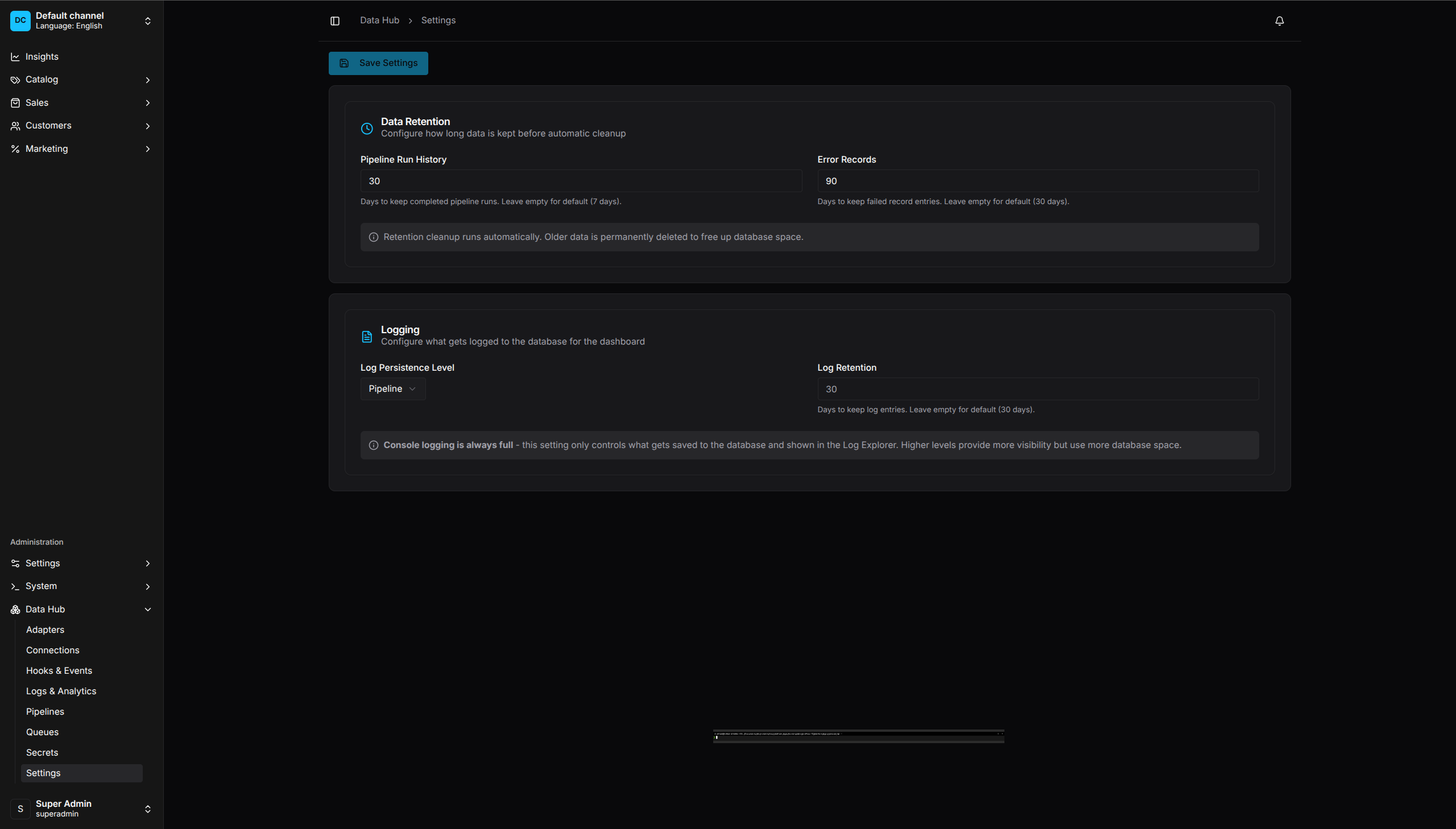
Settings UI - Configure data retention and logging options
Plugin Options
DataHubPlugin.init({
    // Core settings
    enabled: true,
    registerBuiltinAdapters: true,
    debug: false,

    // Retention
    retentionDaysRuns: 30,
    retentionDaysErrors: 90,

    // Code-first configuration
    pipelines: [],
    secrets: [],
    connections: [],
    adapters: [],
    adapterFactories: [],
    feedGenerators: [],
    connectors: [],
    importTemplates: [],
    exportTemplates: [],
    scripts: {},
    configPath: undefined,

    // Runtime configuration
    runtime: {
        circuitBreaker: { failureThreshold: 5 },
        scheduler: { refreshIntervalMs: 60_000 },
    },

    // Optional OTLP/HTTP JSON metrics and trace export
    telemetry: process.env.OTEL_EXPORTER_OTLP_ENDPOINT ? {
        endpoint: process.env.OTEL_EXPORTER_OTLP_ENDPOINT,
        serviceName: 'vendure-data-hub',
        environment: process.env.NODE_ENV,
    } : undefined,

    // Security configuration
    security: {
        ssrf: { /* SSRF protection settings */ },
        script: { enabled: true },
    },

    // Notification settings (for gate approval emails)
    notifications: {
        smtp: { host: 'smtp.example.com', port: 587, /* ... */ },
    },
})
Option Reference
enabled
| Type | boolean |
| Default | true |
| Description | Enable code-first pipeline/connection synchronization and code-first secret registration |
DataHubPlugin.init({
    enabled: process.env.DATAHUB_ENABLED !== 'false',
})
Setting enabled: false does not unregister the plugin’s API, dashboard,
controllers, jobs, or built-in adapters. Omit DataHubPlugin from the Vendure
configuration when the entire plugin must be absent.
The standalone dashboard development server binds to the localhost loopback
name and requires its configured port by default. Set VITE_DEV_HOST=0.0.0.0
only when remote or container access is intentional and protected by the
surrounding network.
registerBuiltinAdapters
| Type | boolean |
| Default | true |
| Description | Register built-in extractors, operators, and loaders |
Set to false if you want to register only custom adapters.
debug
| Type | boolean |
| Default | false |
| Description | Enable detailed debug logging |
DataHubPlugin.init({
    debug: process.env.NODE_ENV !== 'production',
})
retentionDaysRuns
| Type | number |
| Default | 30 |
| Description | Days to keep pipeline run history (0..365; 0 disables cleanup) |
Old runs are deleted automatically by the retention job. The job runs in the Vendure server process under the configured distributed lock. Database work is bounded to 1,000 rows per statement and 10,000 rows per entity per daily cycle; larger backlogs continue in later cycles.
retentionDaysErrors
| Type | number |
| Default | 90 |
| Description | Days to keep error records (0..365; 0 disables cleanup) |
Quarantined records older than this are deleted.
pipelines
| Type | CodeFirstPipeline[] |
| Default | [] |
| Description | Code-first pipeline definitions |
interface CodeFirstPipeline {
    code: string;
    name: string;
    description?: string;
    enabled?: boolean;
    definition: PipelineDefinition;
    tags?: string[];
}
secrets
| Type | CodeFirstSecret[] |
| Default | [] |
| Description | Code-first secret definitions |
interface CodeFirstSecret {
    code: string;
    provider: 'INLINE' | 'ENV';
    value: string;
    metadata?: Record<string, unknown>;
    channelCodes?: string[];
}
Code-first secrets are always available in Vendure’s default channel. Set channelCodes
to explicitly make a secret available to additional channels. Database-backed secrets
use the channel assignments managed in the Dashboard and Admin API.
ENV values must be one canonical environment-variable name and must exist in every executing API server or worker. Code-first INLINE values stay plaintext in source and are rejected in production even when DATAHUB_MASTER_KEY is set. The master key encrypts database-backed INLINE values only. In non-production, code-first INLINE requires a valid master key.
connections
| Type | CodeFirstConnection[] |
| Default | [] |
| Description | Code-first connection definitions |
interface CodeFirstConnection {
    code: string;           // Unique connection identifier
    type: 'HTTP' | 'REST' | 'GRAPHQL' | 'S3' | 'FTP' | 'SFTP'
        | 'POSTGRES' | 'MYSQL' | 'RABBITMQ' | 'SQS' | 'REDIS' | 'CUSTOM';
    settings: JsonObject;   // Connection settings - supports env var references like ${DB_HOST}
}
adapters
| Type | DataHubAdapter[] |
| Default | [] |
| Description | Executable custom adapter registrations |
type DataHubAdapter<TConfig = unknown> =
    | ExtractorAdapter<TConfig>
    | BatchExtractorAdapter<TConfig>
    | OperatorAdapter<TConfig>
    | SingleRecordOperator<TConfig>
    | LoaderAdapter<TConfig>
    | ValidatorAdapter<TConfig>
    | EnricherAdapter<TConfig>
    | ExporterAdapter<TConfig>
    | FeedAdapter<TConfig>
    | SinkAdapter<TConfig>;
Example:
DataHubPlugin.init({
    adapters: [myCustomExtractor, currencyConvertOperator],
})
The adapter object must include both its metadata and its runtime method, such
as extract, load, or apply. A metadata-only AdapterDefinition is not
executable and is rejected by runtime registration. Each adapter can retain a
strongly typed configuration object; registration does not require an index
signature, any, or a cast. See
Extending the Plugin for detailed
documentation on creating custom adapters.
adapterFactories
| Type | DataHubAdapterFactory[] |
| Default | [] |
| Description | Construct executable adapters that depend on Vendure or Nest services |
import { ProductService } from '@vendure/core';
import {
    DataHubAdapterFactory,
    DataHubPlugin,
} from '@oronts/vendure-data-hub-plugin';
import { createProductLoader, productLoaderDefinition } from './product-loader';

const productLoaderFactory: DataHubAdapterFactory = {
    code: productLoaderDefinition.code,
    definition: productLoaderDefinition,
    create: injector => createProductLoader({
        productService: injector.get(ProductService),
    }),
};

DataHubPlugin.init({ adapterFactories: [productLoaderFactory] });
The factory code, declared definition, and constructed runtime metadata must
match. Use this path instead of a module-global service locator when an adapter
needs injected application services.
feedGenerators
| Type | CustomFeedGenerator[] |
| Default | [] |
| Description | Custom feed generator registrations |
DataHubPlugin.init({
    feedGenerators: [
        myCustomFeedGenerator,
    ],
})
runtime
| Type | RuntimeLimitsConfig |
| Default | Built-in constants |
| Description | Global settings read by runtime services |
The current runtime consumers apply these groups:
interface EffectiveRuntimeLimits {
    circuitBreaker?: {
        enabled?: boolean;
        failureThreshold?: number;
        successThreshold?: number;
        resetTimeoutMs?: number;
        failureWindowMs?: number;
    };
    scheduler?: {
        checkIntervalMs?: number;
        refreshIntervalMs?: number;
        minIntervalMs?: number;
        maxPipelineDiscovery?: number;
        maxTrackingEntries?: number;
        maxConsecutiveFailures?: number;
    };
}
Example:
DataHubPlugin.init({
    runtime: {
        circuitBreaker: {
            failureThreshold: 10,
            resetTimeoutMs: 60_000,
        },
        scheduler: {
            checkIntervalMs: 30_000,
            refreshIntervalMs: 60_000,
            maxPipelineDiscovery: 1_000,
            maxTrackingEntries: 1_000,
            maxConsecutiveFailures: 5,
        },
    },
})
telemetry
| Type | OtlpTelemetryConfig |
| Default | undefined |
| Description | Optional process-local metrics and completed-span export over OTLP/HTTP JSON |
| Field | Default | Valid values |
|---|---|---|
endpoint |
Required | HTTP(S) collector base URL without credentials, query, or fragment |
enabled |
true |
Boolean |
metrics |
true |
Boolean |
traces |
true |
Boolean |
headers |
{} |
Up to 32 valid HTTP header pairs |
tls.caFile |
Unset | PEM certificate authorities trusted for this collector only |
tls.clientCertificateFile |
Unset | PEM client certificate chain; requires clientKeyFile |
tls.clientKeyFile |
Unset | PEM client private key; requires clientCertificateFile |
tls.clientKeyPassphrase |
Unset | Optional encrypted client-key passphrase |
serviceName |
@oronts/vendure-data-hub-plugin |
OpenTelemetry service.name |
serviceVersion |
Unset | OpenTelemetry service.version |
environment |
Unset | OpenTelemetry deployment.environment.name |
exportIntervalMs |
30000 |
Integer from 1,000 to 300,000 |
requestTimeoutMs |
5000 |
Integer from 100 to 30,000 |
maxQueueSize |
2048 |
Integer from 1 to 10,000 |
maxBatchSize |
256 |
Integer from 1 to 1,000 |
maxRequestBodyBytes |
67108864 |
Integer from 1,024 to 67,108,864 |
The endpoint is a base URL; the exporter appends /v1/metrics and
/v1/traces. Omit the option or set enabled: false for no background
timer and no telemetry network requests. Header values should come from
deployment secrets. Production collectors should use HTTPS with a certificate
trusted by the Node.js process or configure tls.caFile for a collector-scoped
private CA. Mutual TLS requires both tls.clientCertificateFile and
tls.clientKeyFile; an encrypted key can use tls.clientKeyPassphrase.
Certificate verification remains enabled and no process-wide TLS bypass is
provided. Restrict certificate and key files to the Vendure process account,
mount the same material in every exporting API and worker, and rotate it using
the deployment secret manager. See
Performance and Scaling for
cardinality, queue, failure, and data-minimization behavior.
security
| Type | SecurityConfig |
| Default | See below |
| Description | Security configuration for SSRF protection and script execution |
interface SecurityConfig {
    ssrf?: UrlSecurityConfig;
    script?: {
        enabled?: boolean;
        defaultTimeoutMs?: number; // integer from 1 to 300000
        validation?: {
            maxCodeLength?: number;
            maxConditionLength?: number;
            maxExpressionComplexity?: number;
            maxPropertyAccessDepth?: number;
            allowArrayMethods?: boolean;
            allowStringMethods?: boolean;
        };
    };
}
Node VM execution is not a hostile-code security boundary. Disable scripts when pipeline authors are not trusted administrators.
Example:
DataHubPlugin.init({
    security: {
        script: {
            enabled: true,
            defaultTimeoutMs: 10000,
        },
    },
})
notifications
| Type | { smtp?: NotificationSmtpConfig } |
| Default | undefined |
| Description | SMTP settings for gate approval notification emails |
interface NotificationSmtpConfig {
    host: string;
    port: number;
    secure?: boolean;               // Defaults to true for port 465
    auth?: { user: string; pass: string };
    from?: string;                   // Sender address
}
Example:
DataHubPlugin.init({
    notifications: {
        smtp: {
            host: 'smtp.example.com',
            port: 587,
            auth: { user: 'notifications@example.com', pass: process.env.SMTP_PASS! },
            from: 'DataHub <notifications@example.com>',
        },
    },
})
When configured, GATE steps with notifyEmail will send approval notification emails via this SMTP server. Without this configuration, email notifications are skipped with a warning.
importTemplates
| Type | CustomImportTemplate[] |
| Default | Built-in templates (REST API Sync, JSON Import, Magento CSV, XML Feed, ERP Inventory, CRM Customer) |
| Description | Custom import templates for the import wizard |
interface CustomImportTemplate {
    id: string;
    name: string;
    description: string;
    category: string;         // 'products' | 'customers' | 'inventory' | 'catalog'
    icon?: string;            // Supported lucide-react name; unknown names use the UI fallback
    requiredFields: string[];
    optionalFields?: string[];
    sampleData?: JsonObject[];
    featured?: boolean;
    tags?: string[];
    formats?: string[];       // 'CSV' | 'JSON' | 'XML' | 'API'
    definition?: {
        sourceType?: string;
        fileFormat?: string;
        targetEntity?: string;
        existingRecords?: string;
        lookupFields?: string[];
        fieldMappings?: { sourceField: string; targetField: string }[];
    };
}
connectors
| Type | DataHubPluginOptions['connectors'] |
| Default | [] |
| Description | Register configured connector templates and runtime adapters |
Connectors can ship templates, adapters, and pipeline factories. Pimcore uses
configuration-aware generated pipelines; register the configured connector and
pass its generated pipelines explicitly. The saved connection may be HTTP,
REST, or GRAPHQL when it defines baseUrl and Secret-backed
authentication. Use the canonical
Pimcore connector guide for
the complete registration, schema, query override, credential, and smoke-test
contract instead of duplicating it here.
exportTemplates
| Type | CustomExportTemplate[] |
| Default | Built-in templates (Product XML Feed, Order Analytics CSV, Customer GDPR Export, Inventory Report) |
| Description | Custom export templates for the export wizard |
interface CustomExportTemplate {
    id: string;
    name: string;
    description: string;
    icon?: string;
    format: string;
    requiredFields?: string[];
    tags?: string[];
    definition?: {
        sourceEntity?: string;
        fields?: string[];
        formatOptions?: Record<string, unknown>;
    };
}
scripts
| Type | Record<string, ScriptFunction> |
| Default | undefined |
| Description | Named script functions for use in pipeline hook actions |
Scripts registered via plugin options are auto-registered on startup and can be referenced by name in SCRIPT hook actions within pipeline definitions.
type ScriptFunction = (
    records: readonly JsonObject[],
    context: HookContext,
    args?: JsonObject,
) => Promise<JsonObject[]> | JsonObject[];
Example:
DataHubPlugin.init({
    scripts: {
        'validate-sku': async (records, context) => {
            return records.filter(r => r.sku && String(r.sku).length > 0);
        },
        'enrich-pricing': async (records, context) => {
            return records.map(r => ({ ...r, priceInCents: Number(r.price) * 100 }));
        },
    },
})
Use in pipeline definitions:
hooks: {
    AFTER_EXTRACT: [{ type: 'SCRIPT', scriptName: 'validate-sku' }],
    BEFORE_LOAD: [{ type: 'SCRIPT', scriptName: 'enrich-pricing', args: { currency: 'USD' } }],
}
Scripts have full access to the HookContext (pipelineId, runId, stage) and optional args passed from the hook action. They can filter, transform, enrich, or reject records.
configPath
| Type | string |
| Default | undefined |
| Description | Path to external config file |
Load configuration from YAML or JSON file:
DataHubPlugin.init({
    configPath: './config/data-hub.yaml',
})
Relative paths resolve from the process working directory. Only .json, .yaml, and .yml are accepted, and the document root must be an object. When configPath is configured, missing, unreadable, unsupported, malformed, or invalid secret configuration aborts startup.
File secrets stay in memory. They are loaded before secret consumers, then inline plugin secret options are overlaid so inline options win on cross-source codes. Duplicate codes within the file or within inline options are rejected.
During application bootstrap, one API server validates the complete effective connection and pipeline configuration, then reconciles it under a distributed lock. Inline entries override same-code file entries, unchanged rows are not rewritten, and validation fails before any configuration row is changed. Workers perform no writes; they wait for the shared database to match before schedule, message, and file-trigger discovery starts. New or changed pipeline definitions still require the normal review and publish workflow before execution.
A config file is not an encrypted secret store. Production code-first INLINE values are rejected; use ENV references.
Environment Variables
Use environment variables in configurations:
Redis coordination
Choose one Data Hub Redis discovery mode:
| Variable | Default | Purpose |
|---|---|---|
DATAHUB_REDIS_URL |
Unset | Standalone redis:// or rediss:// URL; REDIS_URL is the fallback |
DATAHUB_REDIS_SENTINELS |
Unset | Comma-separated Sentinel host[:port] nodes; port defaults to 26379 |
DATAHUB_REDIS_SENTINEL_NAME |
Unset | Required monitored-master name for Sentinel mode |
DATAHUB_REDIS_DB |
0 |
Non-negative database number for Sentinel-discovered data nodes |
DATAHUB_REDIS_USERNAME |
Unset | Optional data-node ACL username |
DATAHUB_REDIS_PASSWORD |
Unset | Optional data-node password |
DATAHUB_REDIS_SENTINEL_USERNAME |
Unset | Optional Sentinel ACL username |
DATAHUB_REDIS_SENTINEL_PASSWORD |
Unset | Optional Sentinel password |
DATAHUB_REDIS_TLS |
false |
Enable TLS to Sentinel-discovered data nodes |
DATAHUB_REDIS_SENTINEL_TLS |
false |
Enable TLS to Sentinel nodes |
DATAHUB_REDIS_URL and the Sentinel node/name pair are mutually exclusive.
Sentinel mode takes precedence over the shared REDIS_URL fallback. Invalid,
partial, or duplicate Sentinel settings fail startup. Put credentials in the
deployment secret manager, configure the same values on every API server and
worker, and never include credentials in DATAHUB_REDIS_SENTINELS.
Redis TLS verifies certificates through the Node.js trust store. Set
NODE_EXTRA_CA_CERTS before the process starts when a private CA must be added;
do not disable certificate validation. The webhook limiter uses atomic
fixed-window counters with bounded connection and command timeouts across API
instances.
When neither discovery mode is configured, webhook rate limiting remains process-local for
local development and single-instance deployments. When Redis is configured
but Redis becomes unavailable after startup, incoming webhook admission fails
closed with 503 instead of silently switching to independent local counters.
The same Redis configuration also auto-selects Redis for distributed locks unless
DATAHUB_LOCK_BACKEND selects another valid backend. Redis lock initialization
is intentionally fail-closed and can prevent application bootstrap. To isolate
webhook-limiter outages from lock initialization on PostgreSQL, set
DATAHUB_LOCK_BACKEND=POSTGRES explicitly.
This global configuration is used only by distributed locks and incoming webhook rate limits. Redis Streams triggers and sinks use their saved connection records, including their own host, port, database, authentication, and TLS settings; they do not inherit global Sentinel discovery.
Server-local output
DATA_HUB_EXPORT_ROOT sets the root for local exporter and feed files. It defaults to <cwd>/exports and is resolved when the process starts. In production, point it at a writable persistent directory:
DATA_HUB_EXPORT_ROOT=/var/lib/vendure-data-hub/exports
Pipeline values stay relative to that root: use path: 'catalog' for a local exporter directory and outputPath: 'feeds/catalog.xml' for a feed. Do not put absolute server paths or URLs in those pipeline fields. FTP/SFTP remote paths and HTTP destination URLs use their destination-specific settings.
Asset storage
| Variable | Required | Description |
|---|---|---|
DATA_HUB_STORAGE_TYPE |
No | local (default) or s3; unknown values fail startup |
DATA_HUB_STORAGE_PATH |
Local only | Local base directory; defaults to data-hub-uploads |
DATA_HUB_S3_BUCKET |
S3 | Bucket name |
DATA_HUB_S3_REGION |
No | Region; defaults to us-east-1 |
DATA_HUB_S3_ACCESS_KEY_ID |
No | Static access key; configure together with the secret key |
DATA_HUB_S3_SECRET_ACCESS_KEY |
No | Static secret key; configure together with the access key |
DATA_HUB_S3_ENDPOINT |
No | HTTP(S) endpoint for an S3-compatible service |
DATA_HUB_S3_PREFIX |
No | Object-key prefix |
DATA_HUB_S3_URL_EXPIRY |
No | Signed-URL lifetime from 1 to 604800 seconds; defaults to 3600 |
When static S3 credentials are omitted, the AWS SDK credential chain is used. Prefer a workload role in production.
In Secrets
secrets: [
    { code: 'api-key', provider: 'ENV', value: 'MY_API_KEY' },
]
In Connections
Use ${VAR} for non-secret values and Secret Codes for credentials:
DataHubPlugin.init({
    secrets: [
        { code: 'db-password', provider: 'ENV', value: 'DB_PASSWORD' },
    ],
    connections: [
        {
            code: 'db',
            type: 'POSTGRES',
            settings: {
                host: '${DB_HOST}',
                port: 5432,
                database: '${DB_NAME}',
                username: '${DB_USER}',
                passwordSecretCode: 'db-password',
            },
        },
    ],
})
External Config File
YAML Format
# data-hub.yaml
secrets:
  - code: supplier-api
    provider: ENV
    value: SUPPLIER_API_KEY
  - code: erp-db-password
    provider: ENV
    value: ERP_DB_PASSWORD

connections:
  - code: erp-db
    type: POSTGRES
    settings:
      host: ${ERP_DB_HOST}
      port: 5432
      database: erp
      username: ${ERP_DB_USER}
      passwordSecretCode: erp-db-password

pipelines:
  - code: product-sync
    name: Product Sync
    enabled: true
    definition:
      version: 1
      steps:
        - key: trigger
          type: TRIGGER
          config:
            type: SCHEDULE
            cron: "0 2 * * *"
JSON Format
{
    "secrets": [
        { "code": "api-key", "provider": "ENV", "value": "API_KEY" }
    ],
    "connections": [],
    "pipelines": []
}
Runtime Settings
These settings can be changed via the Vendure Dashboard or GraphQL:
| Setting | Description |
|---|---|
retentionDaysRuns |
1..365 purges older run history; 0 disables cleanup; null restores the server default |
retentionDaysErrors |
1..365 purges older record errors; 0 disables cleanup; null restores the server default |
retentionDaysLogs |
1..365 purges older pipeline logs; null or 0 disables log cleanup |
logPersistenceLevel |
Minimum log level to persist |
mutation {
    updateDataHubSettings(input: {
        retentionDaysRuns: 60
        retentionDaysErrors: 90
        logPersistenceLevel: PIPELINE
    }) {
        retentionDaysRuns
        retentionDaysErrors
    }
}
Job Queue Configuration
Configure Vendure’s job queue for pipeline execution:
// vendure-config.ts
export const config: VendureConfig = {
    jobQueueOptions: {
        activeQueues: [
            'default',
            'data-hub.event-trigger-outbox',
            'data-hub.webhook-retry',
            'data-hub.remote-source-acknowledgement',
            'data-hub.run',
        ],
        pollInterval: 1000,
    },
};
Queue Names
| Queue | Purpose |
|---|---|
data-hub.run |
Pipeline execution jobs |
data-hub.event-trigger-outbox |
Durable Vendure event handoff jobs |
data-hub.webhook-retry |
Durable outgoing webhook delivery jobs |
data-hub.remote-source-acknowledgement |
Durable S3 and FTP/SFTP delete-or-move acknowledgement recovery |
Schedule checking uses process timers plus occurrence-scoped distributed
leases. A cron minute or fixed-interval bucket is claimed once across API
processes. Scheduled starts are enqueued on data-hub.run; no separate schedule
queue is required.
Worker Scaling
For high-volume pipelines, run dedicated workers:
// worker.ts
import { bootstrapWorker, Logger } from '@vendure/core';
import config from './vendure-config';

bootstrapWorker(config)
    .then(worker => worker.startJobQueue())
    .then(worker => worker.startHealthCheckServer({ port: 3020 }))
    .catch(err => {
        Logger.error(
            `Worker failed to start: ${err instanceof Error ? err.message : String(err)}`,
            'DataHubWorker',
        );
        process.exitCode = 1;
    });
Example Configurations
Development
DataHubPlugin.init({
    enabled: true,
    debug: true,
    retentionDaysRuns: 7,
    secrets: [
        { code: 'test-api', provider: 'ENV', value: 'TEST_API_KEY' },
    ],
})
Production
DataHubPlugin.init({
    enabled: true,
    debug: false,
    retentionDaysRuns: 30,
    retentionDaysErrors: 90,
    configPath: './config/data-hub.yaml',
})
Multi-Environment
const isProd = process.env.NODE_ENV === 'production';

DataHubPlugin.init({
    enabled: true,
    debug: !isProd,
    retentionDaysRuns: isProd ? 30 : 7,
    secrets: [
        { code: 'api-key', provider: 'ENV', value: 'API_KEY' },
        { code: 'main-db-password', provider: 'ENV', value: 'DB_PASSWORD' },
    ],
    connections: [
        {
            code: 'main-db',
            type: 'POSTGRES',
            settings: {
                host: '${DB_HOST}',
                port: 5432,
                database: '${DB_NAME}',
                username: '${DB_USER}',
                passwordSecretCode: 'main-db-password',
            },
        },
    ],
})